Standing Up Wazuh Twice: What the Hardware Swap Taught Me
Contents
- The role swap
- Repurposing the host in place
- The cloud-init trap
- Two mistakes worth keeping
- Firewall first, then install
- The install, and the leftover that blocked it
- The baseline you can only capture once
- The first agent, and a rule that was saved but not enforced
- The agent that was not crossing the firewall
- The hypervisor, and three ways a vendor’s command assumes your platform
- Four baselines, and the obvious reading is the wrong one
- What I am taking forward
On 29 August the lab’s SIEM lost power and did not come back. It was a physical Rocky Linux box running Wazuh at 192.168.20.2, and it was the second hardware failure in this lab after a server NIC. For a week, pfSense kept logging locally and nothing was being collected, shipped or correlated. A security lab with no SIEM is a network with opinions and no evidence.
The obvious response was to rebuild the same thing on the same kind of hardware. The better question was which machine should hold this role, and answering it is what made the second build better than the first.
The role swap
At that point I had two physical Linux hosts and a hypervisor with spare capacity. The monitoring host was a Dell OptiPlex 9020 with 8 cores and 16 GB of RAM, running Grafana and Prometheus, a workload that fits comfortably in about 2 GB. The service that needed rebuilding, Wazuh, ships an Indexer (OpenSearch underneath) whose practical memory floor is around 8 GB, and which accumulates data that has to survive.
The roles were the wrong way round. The failure was the opportunity to correct it.
| Before | After | |
|---|---|---|
| Dell OptiPlex 9020 (physical) | Grafana and Prometheus, VLAN 60 | SIEM01, Wazuh, VLAN 20 |
| Proxmox guest | none | MON01, Grafana and Prometheus, VLAN 60 |
The principle generalises: put the memory-hungry, data-bearing service on dedicated hardware, and the light, reproducible one on the hypervisor. Grafana and Prometheus can be rebuilt from a configuration file in minutes. A SIEM’s value is its accumulated history and the fact that it keeps running while everything around it is being investigated.

The disk figure matters as much as the memory: 424 GB free of a 455 GB volume, and the Indexer is what eventually fills a SIEM’s storage.
Repurposing the host in place
I did not reinstall. Ubuntu 24.04 carried over, which means Wazuh moved from Rocky Linux to Ubuntu in the process. Three changes moved the machine from one role to the other: a rename to SIEM01 (the old name, nbl-core-ub01, encoded the operating system and nothing about the machine’s purpose, which is exactly the failure the naming convention exists to prevent), a re-address from VLAN 60 to VLAN 20, and a recable from switch Port 8 to Port 4.
The cloud-init trap
The netplan file on an Ubuntu Server install is named 50-cloud-init.yaml, and that name is a warning. It is generated by cloud-init, the program that configures a fresh machine on first boot. A file written by a program can be rewritten by that program, and a manual edit would be silently reverted at the next boot, leaving the host on its old address on a port that no longer carries that VLAN.
Disabling cloud-init’s network management first is what makes the edit durable:
echo 'network: {config: disabled}' | sudo tee /etc/cloud/cloud.cfg.d/99-disable-network-config.cfgThen the configuration itself, using current netplan syntax (gateway4: is deprecated in 24.04), with DNS pointing at pfSense rather than a public resolver, to match DC01 and KALI01:
network:
  version: 2
  ethernets:
    eno1:
      dhcp4: no
      addresses:
        - 192.168.20.2/24
      routes:
        - to: default
          via: 192.168.20.1
      nameservers:
        addresses: [192.168.20.1]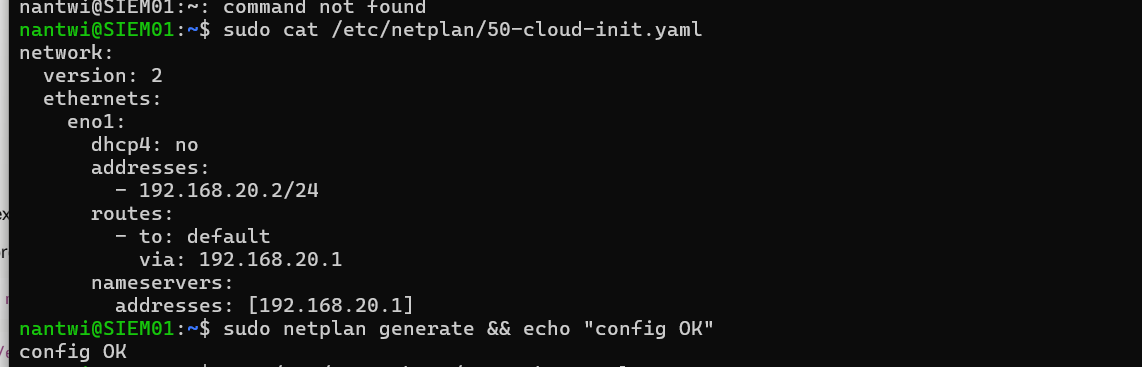
The general lesson: on Linux, a configuration file named after a program is usually owned by that program. Editing it works until the program runs again. Either turn the program off, as here, or put your settings in a higher-numbered file that wins.
Two mistakes worth keeping
I applied the network change before moving the cable. netplan apply ran while the machine was still plugged into the VLAN 60 port, so it immediately held an address that did not exist on the network it was attached to: unreachable, no route to its gateway. Nothing was damaged and moving the cable fixed it, but the correct order is write the configuration, shut down, move the cable, power on. A machine should never be left holding an address its physical connection cannot serve.
SSH refused to connect afterwards. 192.168.20.2 had belonged to the dead Rocky Linux host, whose key was still in my known_hosts. A different machine now answered at that address with a different key, and SSH stopped:
WARNING: REMOTE HOST IDENTIFICATION HAS CHANGED!This is the control working exactly as designed. SSH cannot tell “the hardware was replaced” from “something is intercepting this connection”, so it requires a human decision. Most people delete the line and reconnect. I read the fingerprint from the host itself instead,
sudo ssh-keygen -lf /etc/ssh/ssh_host_ed25519_key.pubconfirmed it matched what SSH had presented, and only then removed the stale record with ssh-keygen -R 192.168.20.2. SSH even volunteered corroboration: the same key was already known under 192.168.60.2, the machine’s previous address. Independent confirmation that this was a host that moved, not a stranger.
Verifying the fingerprint out of band is what turns a dismissed alert into a cleared one. If that warning ever appears when nothing has changed, it is the one time it is telling you something real.
Firewall first, then install
Two rules were needed before the host could even be administered, and I built both before the move rather than after. MGMT-11 lets the management plane reach the SIEM over SSH and the dashboard port, written with aliases (SIEM01_HOST, SIEM_ADMIN) so the rule reads by intent rather than by number. It is logged, because administrative access to the machine holding all the security evidence is privileged activity and has to be attributable (NIST AC-17, AU-2).
Port 443 went into the alias before Wazuh existed, on the expectation that the dashboard would use it. The installer confirmed it during the run, so no rule change was needed afterwards.
One more pre-flight check that is now permanent: confirm the pfSense DNS Resolver is listening on the interface a host is moving to. This was the third time in this lab that a service bound to the wrong interfaces would have produced a correct-looking configuration and a silent failure.
The install, and the leftover that blocked it
Wazuh is three programs, and knowing which is which is the difference between diagnosing a problem and guessing at one: the Indexer (stores and searches events; the memory-hungry one; port 9200 on localhost), the Server or manager (agents connect to it on 1514 and 1515; it applies detection rules), and the Dashboard (the web interface on 443), plus Filebeat shipping the manager’s own alerts into the Indexer. “Wazuh is down” is never a useful diagnosis. It is one of these.
The first install attempt was refused with ERROR: Wazuh manager already installed. There was no manager. There was a wazuh-agent left from when this machine was the monitoring host reporting to the old SIEM, and a manager and an agent cannot coexist because both own /var/ossec. The manager monitors its own host natively, so an agent there would be redundant as well as conflicting.
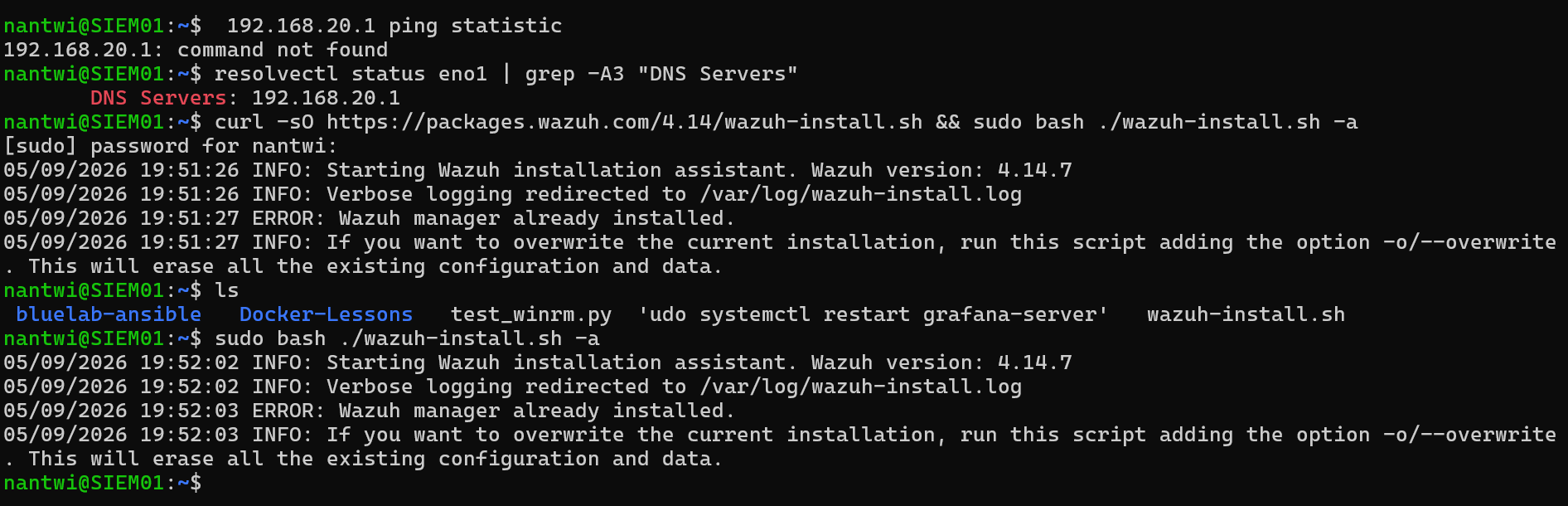
The installer offers --overwrite, which erases all existing Wazuh configuration and data. I removed the one package explicitly instead, because on a machine whose job is to be trustworthy it is worth knowing exactly what changed:
sudo systemctl disable --now wazuh-agent
sudo apt purge -y wazuh-agent
sudo rm -rf /var/ossec
Then the install, downloaded to a file rather than piped into a shell. curl ... | sudo bash executes code as root that nobody has seen, from a server that could have been compromised between publication and retrieval. Downloading first costs nothing and makes inspection possible.
curl -sO https://packages.wazuh.com/4.14/wazuh-install.sh
sudo bash ./wazuh-install.sh -a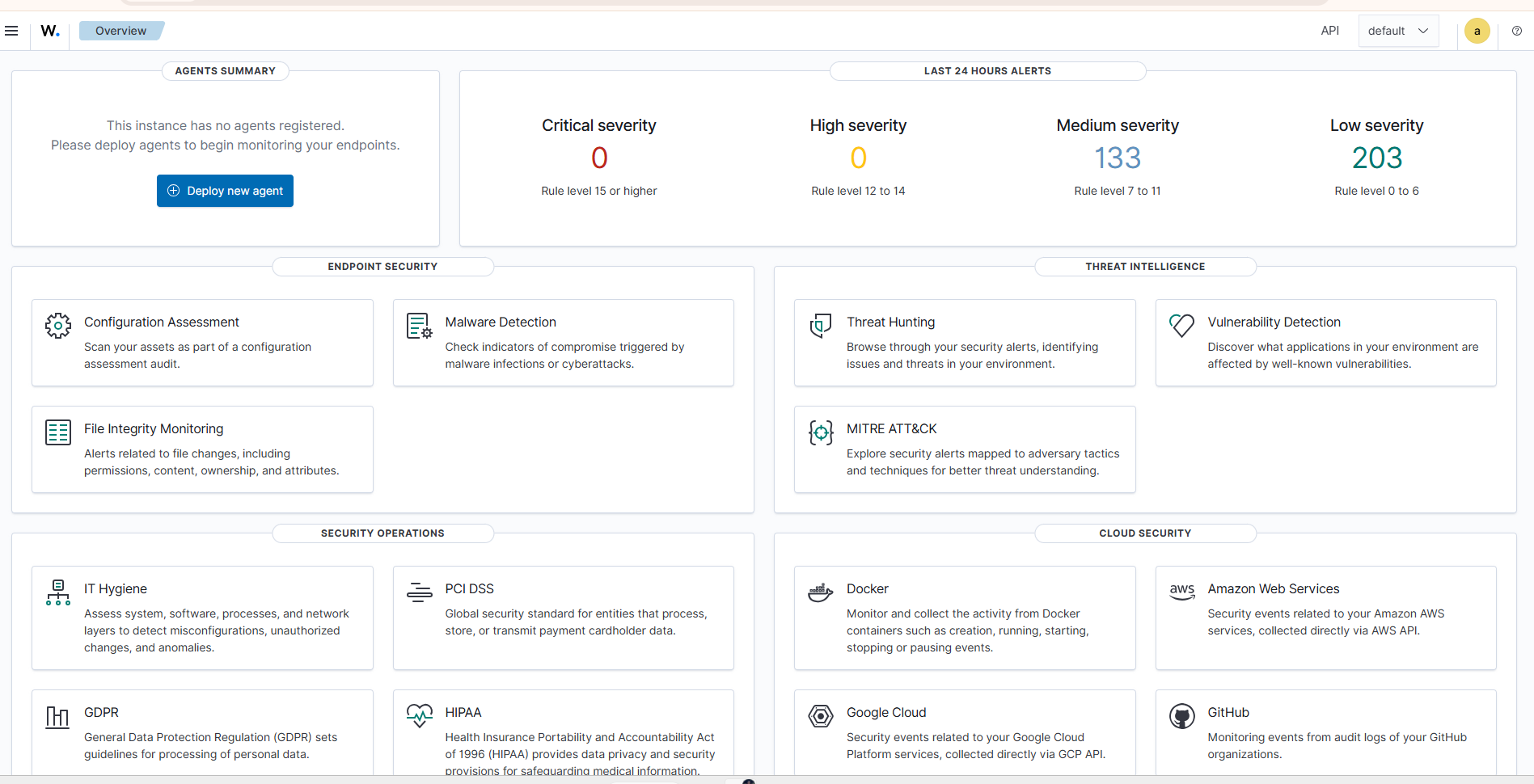
“No agents registered” alongside 336 alerts is not a contradiction. The manager monitors its own host as agent 000, and most of those alerts are Security Configuration Assessment findings: Wazuh ships CIS Benchmark policies and evaluates the host against them at startup. Not detections of an attack; an audit of the machine’s own hardening.
The baseline you can only capture once
Before I changed anything, I recorded the SIEM’s own result against the CIS Ubuntu Linux 24.04 LTS Benchmark: 147 passed, 127 failed, 53.6%.
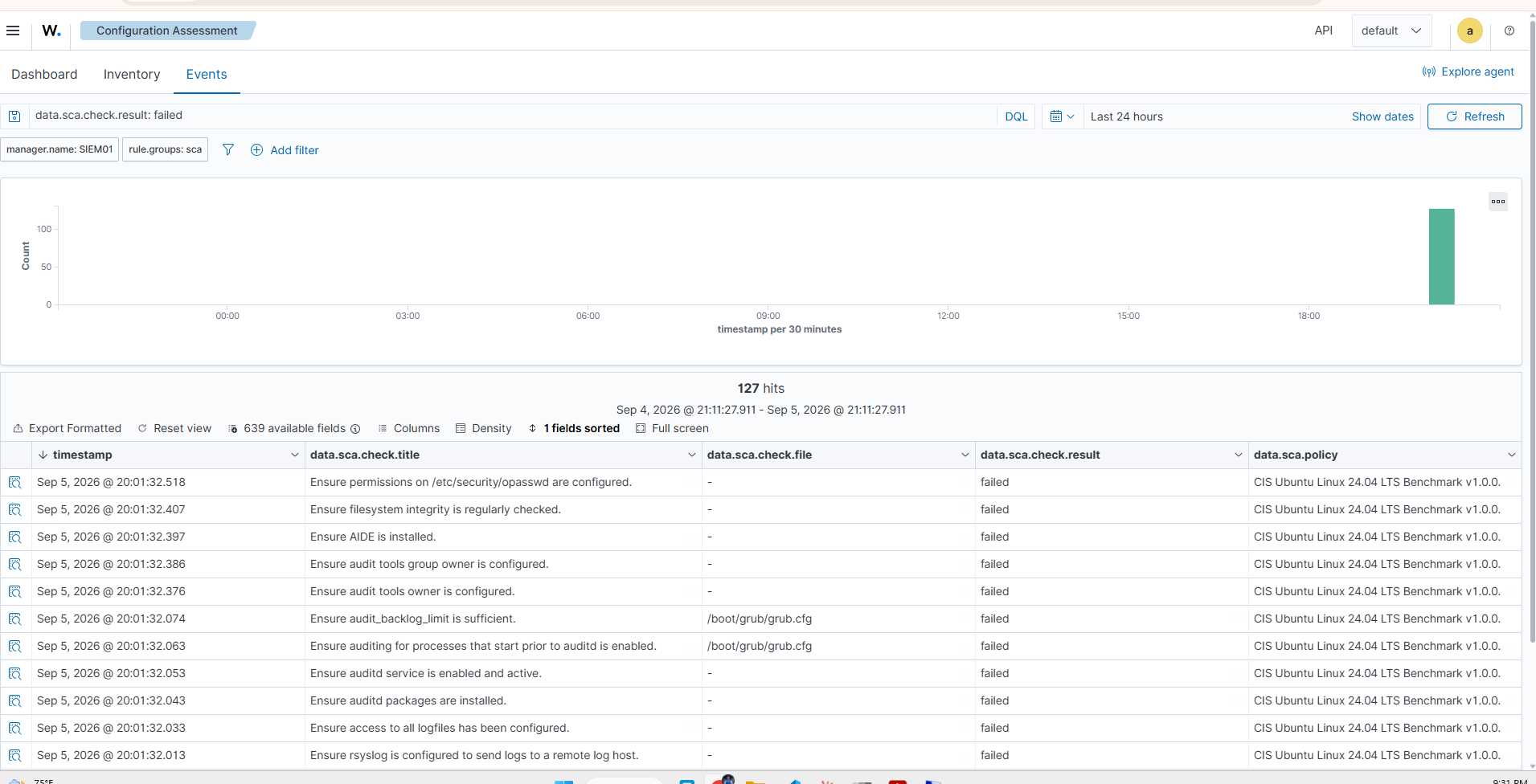
Roughly half a benchmark failing is normal for a default installation, and that is the point. Hardening is work that has to be scheduled and done; it is not a property an operating system arrives with. The reason to capture this before touching anything is that it cannot be recreated later. It is the “before” half of a before-and-after, in the same shape as the management-plane isolation test earlier in this lab, where a control was measured, changed, and measured again.
The first agent, and a rule that was saved but not enforced
Agents dial out to the manager. The manager listens. So the rule that lets DC01 report does not belong on the BlueTeam interface; it belongs on ENTERPRISELAN, the interface DC01’s traffic arrives on. That became ENT-05.

The agent installed on DC01, the service started, and nothing appeared in the dashboard. Two causes, in sequence. The first was the rule itself: I had copied it from MGMT-11 and it carried the wrong source and service, so it matched nothing. The second, after I fixed the rule, was that the filter had not been reloaded. The rule was right, saved, applied, and the agent still could not connect until Status → Filter Reload.
That is the third time a stale filter has produced a different-looking failure in this lab, so it is now principle 9 of the rulebase: a saved rule is not an enforced rule. The diagnostic that separates a broken agent from a blocked one in seconds is Test-NetConnection 192.168.20.2 -Port 1514 from the endpoint. If the port test fails, the problem is the network path and nothing on the endpoint needs touching.
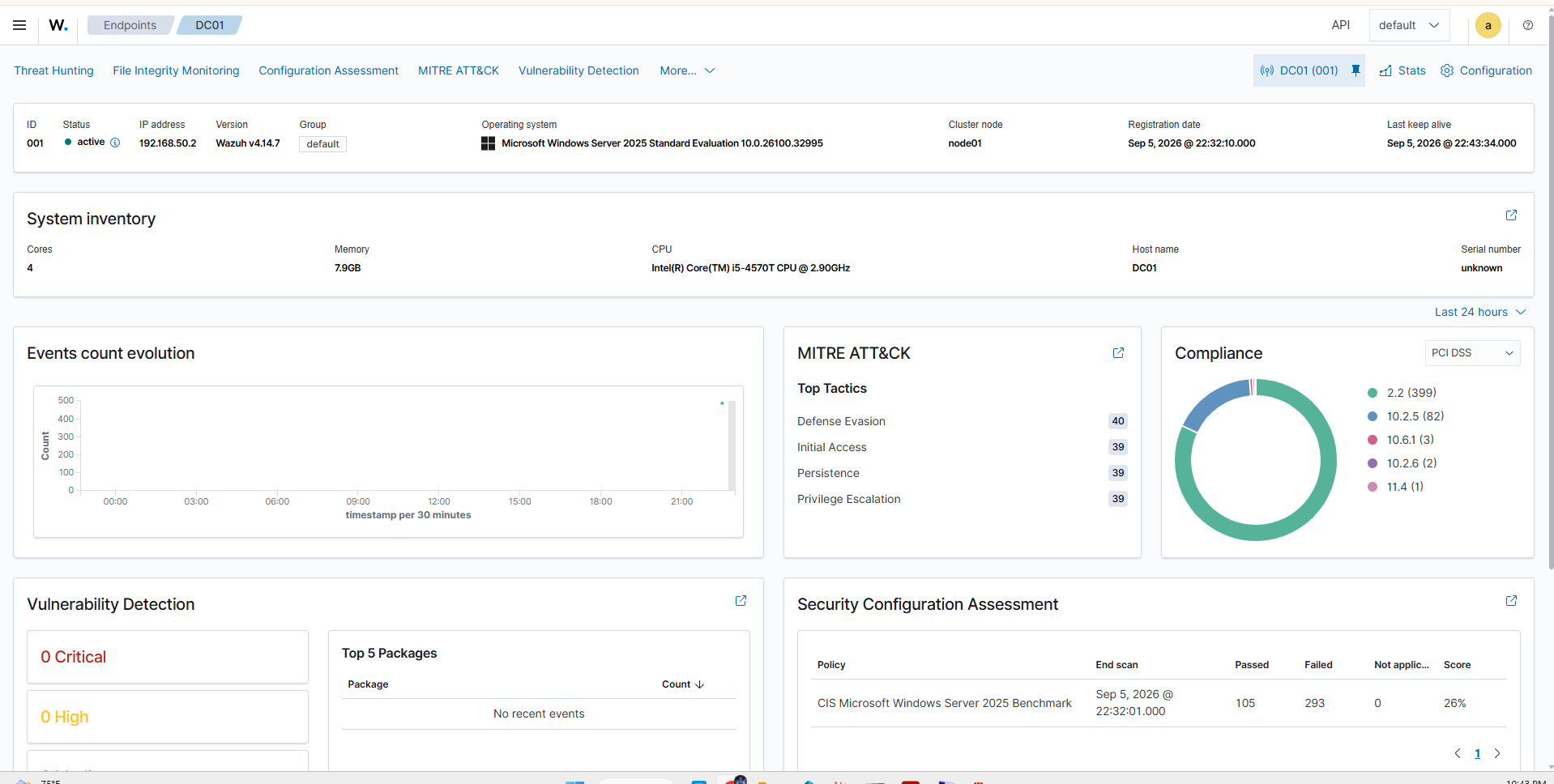
One install: inventory, MITRE ATT&CK tactic counts, vulnerability detection, and a CIS Windows Server 2025 run. The full deployment, both failures included, is on video in the runbook.
The agent that was not crossing the firewall
The second agent was ADM01, my administrative laptop, with a new rule MGMT-12 covering the whole management subnet. It connected first time. The interesting part was the address it registered with: 100.118.195.0, a Tailscale address, not the laptop’s VLAN 10 address.
The traffic had not crossed the firewall at all. pfSense acts as a Tailscale subnet router and advertises the lab networks into the tailnet, so the laptop held a route saying 192.168.20.0/24 is reachable over the Tailscale interface. Windows picks the most specific matching route, a /24 beats the default route, and the overlay won, even with the laptop a few metres from the firewall on VLAN 10. MGMT-12 was correct, applied, and had passed no traffic. The SIEM’s own asset inventory is what exposed it.
A host route beats a /24:
route -p add 192.168.20.2 mask 255.255.255.255 192.168.10.1 metric 1
Restart-Service WazuhSvc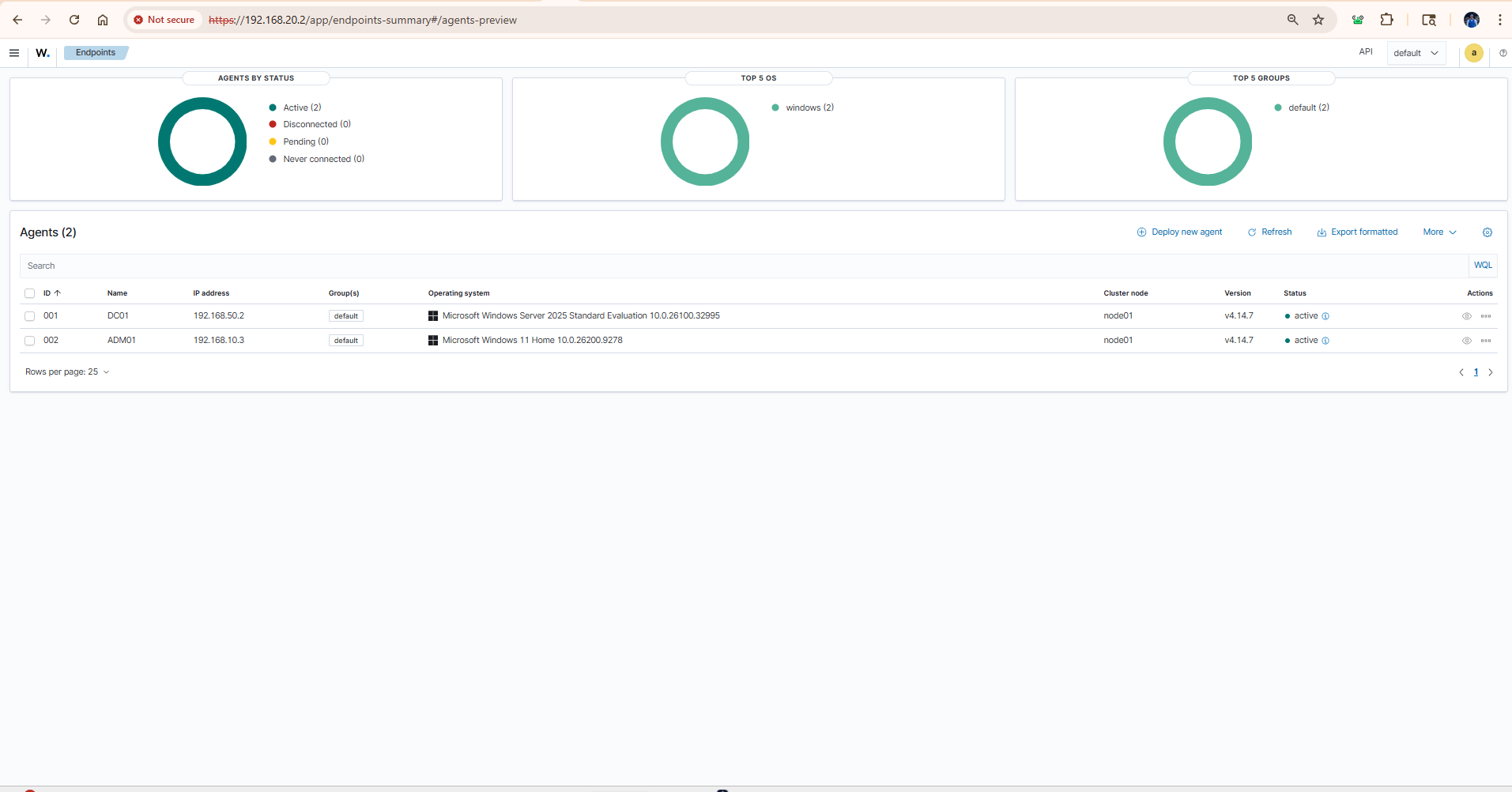
After reconnection the agent re-registered as 192.168.10.3, which is the evidence that the rule is genuinely carrying traffic. Two things to carry forward: an agent’s registered address reports the path taken, not the machine’s identity; and a firewall rule that has never passed traffic proves nothing, however correct it looks.
The hypervisor, and three ways a vendor’s command assumes your platform
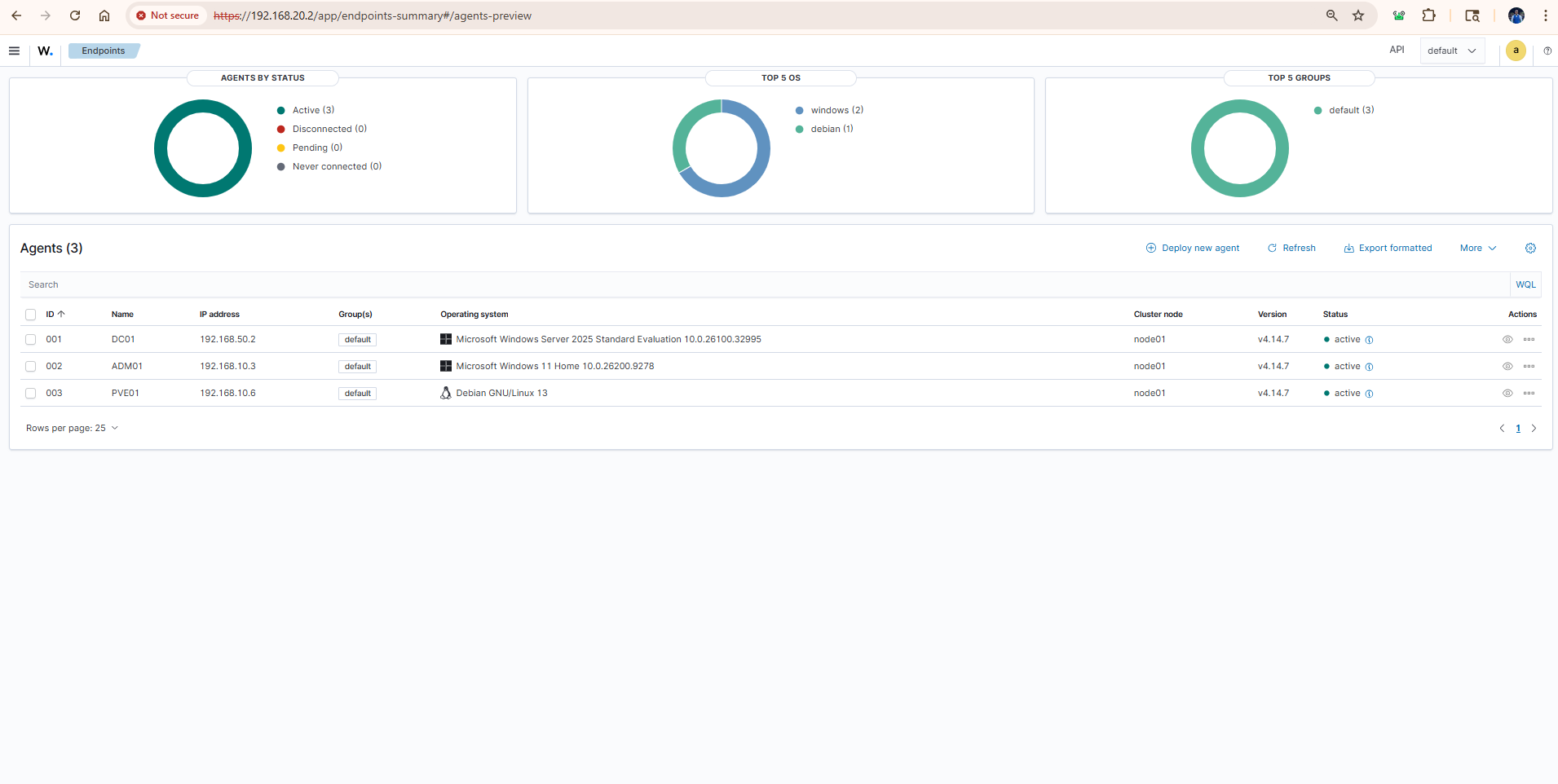
PVE01, the Proxmox host, was enrolled last and is arguably the most important of the three. Compromise it and every guest goes with it. It needed no new rule (MGMT-12 already covered the subnet), and this time I checked the route before installing anything: ip route get 192.168.20.2 showed the path through pfSense from the host’s real address. No Tailscale client on this machine, so this agent is the honest validation of MGMT-12.
The install then failed three times, each for a different reason, all the same class of problem: the dashboard’s generated command assumes a platform you may not be running.
sudo: command not found. Proxmox is a minimal Debian where you operate as root;sudois not installed. The download half of the chained command succeeded, which made the install look like it had worked.wazuh-agent depends on lsb-release.dpkg -iinstalls exactly the file it is given and does not resolve dependencies. Minimal Proxmox does not carrylsb-release.Invalid server address found: 'MANAGER_IP'. The instructive one. TheWAZUH_MANAGERvariable is read by the package’s configure script on first install only. Because the earlier attempt had already unpacked the package, the re-run was treated as a reinstall, the substitution was skipped, and the template placeholder survived.
Repeating the install cannot fix the third. A purge can, followed by verifying the configuration before starting the service:
apt-get purge -y wazuh-agent && rm -rf /var/ossec
WAZUH_MANAGER='192.168.20.2' WAZUH_AGENT_NAME='PVE01' dpkg -i ./wazuh-agent_4.14.7-1_amd64.deb
grep -A3 "<server>" /var/ossec/etc/ossec.conf
A failed installation is not a neutral state. It leaves artifacts that change how the next attempt behaves, and the second attempt can fail in a way that has nothing to do with the original cause. When an install fails partway, purge before retrying.
Four baselines, and the obvious reading is the wrong one
Every agent runs its platform’s CIS benchmark on enrolment, and the manager assesses itself. Four hosts, four operating systems, captured before any hardening.
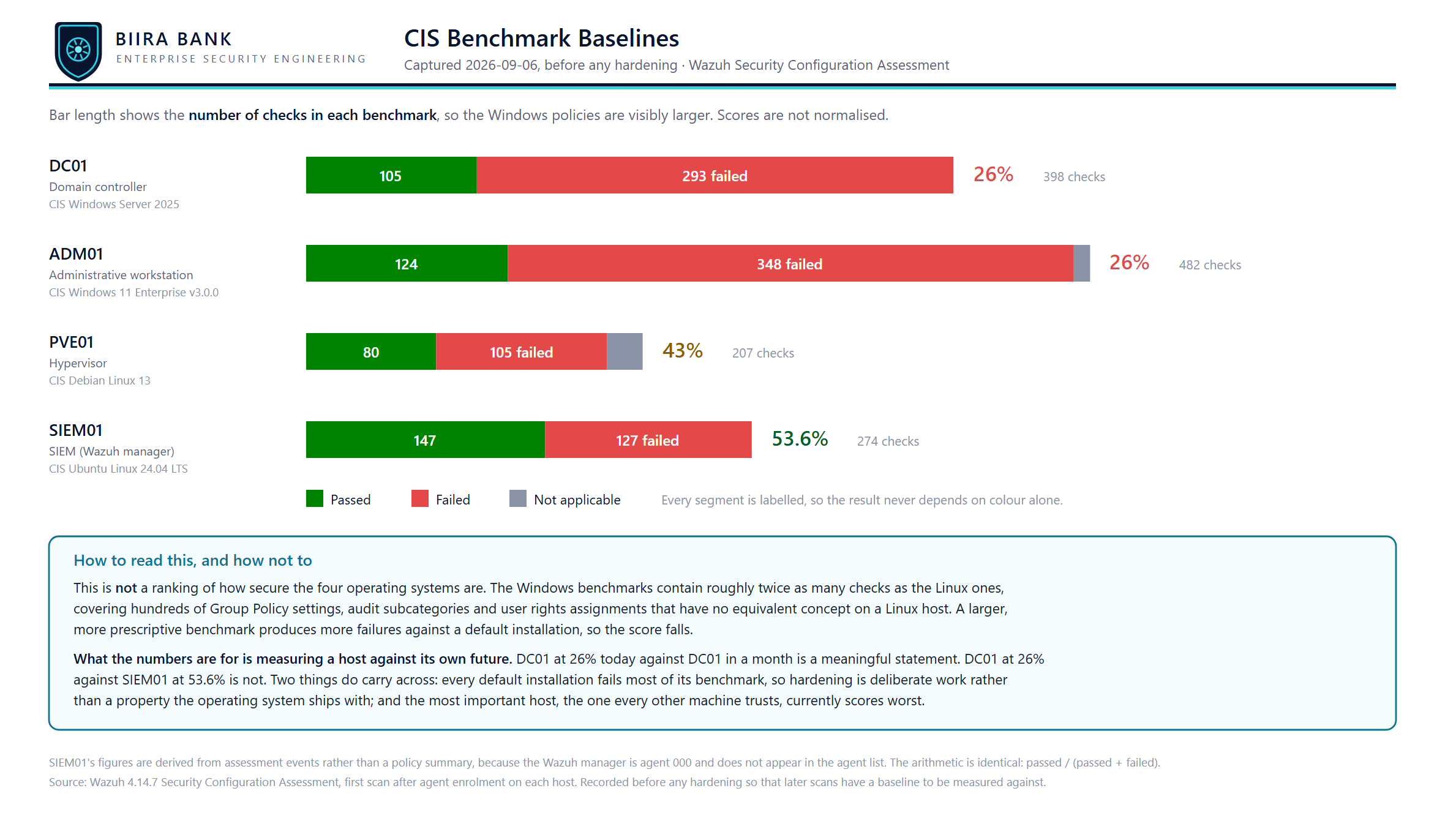
| Host | Benchmark | Passed | Failed | Score |
|---|---|---|---|---|
| DC01 | CIS Windows Server 2025 | 105 | 293 | 26% |
| ADM01 | CIS Windows 11 Enterprise v3.0.0 | 124 | 348 | 26% |
| PVE01 | CIS Debian Linux 13 | 80 | 105 | 43% |
| SIEM01 | CIS Ubuntu Linux 24.04 LTS | 147 | 127 | 53.6% |
This is not a ranking of how secure the four operating systems are, and presenting it as one would be a mistake. The number of checks is the missing variable: the Windows benchmarks contain roughly twice as many checks as the Linux ones, covering hundreds of Group Policy settings, audit subcategories and user-rights assignments that have no equivalent on a Linux host. A larger, more prescriptive benchmark produces more failures against a default installation, so the score falls. That is why the chart keeps the bars proportional to benchmark size instead of normalising to 100%: normalising would make the four look comparable, which is exactly the misreading to avoid.
Two conclusions do carry across all four. Every default installation fails most of its benchmark: roughly half on Linux, three quarters on Windows. And the most important host scores worst: DC01 is the machine every other machine trusts, it has one of the largest benchmarks and the lowest score, and ADM01, the machine domain credentials are typed on, sits beside it at 26%. Those two are where hardening starts.
The numbers are for measuring a host against its own future. DC01 at 26% today against DC01 next month is a statement about work performed. DC01 against SIEM01 is not a statement about anything.
What I am taking forward
- A hardware failure is a chance to re-ask which machine should hold which role. Data-bearing on hardware, reproducible on the hypervisor.
- A configuration file named after a program belongs to that program.
- An SSH host-key warning is a control, and verifying out of band is what clears it.
- A saved firewall rule is not an enforced one, and a rule that has never passed traffic proves nothing. Check the route before you trust the rule.
- A failed install leaves state. Purge before retrying.
- Capture the baseline before you touch anything. A score that moves is the evidence; a score on its own is not.
Next is the last unmonitored host, APP01, and then hardening DC01 against a chosen set of its 293 failing checks and recording the delta. The full runbook, with the dashboard session-timeout outage I have not told you about here, is docs/16 in the repository.
