The Zone That Did Not Exist
Contents
Before a vulnerability scanner can scan a workstation, it has to find it. Mine could not.
The target has to be a name, not an address, because the workstation gets its address from DHCP. Pin a scan to 192.168.50.56 and one day you are scanning nothing, or worse, scanning whatever machine inherited that address. So the scanner needs to turn wks01.corp.biirabank.com into an address, and it lives on a different network segment from the domain that owns that name.
This note walks through why that failed, one hop at a time. The first section is the map. Everything after it happens somewhere on that map, and I will say where.
The setup: what lives where
Three machines and one firewall matter here.
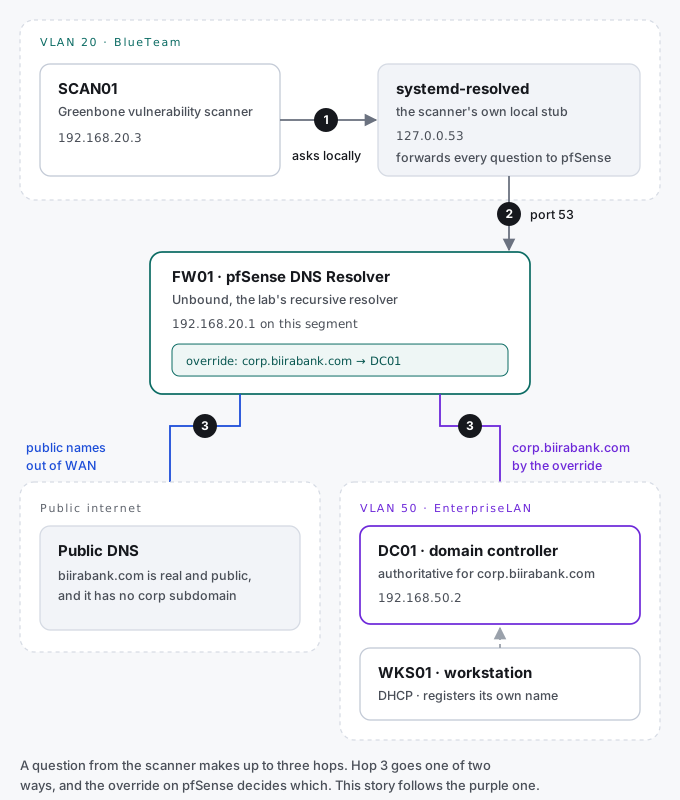
| Machine | Where it sits | Address | Its job in this story |
|---|---|---|---|
| SCAN01 | VLAN 20, the BlueTeam segment | 192.168.20.3 | The Greenbone scanner. It needs to find the workstation by name. |
| systemd-resolved | On SCAN01 itself | 127.0.0.53 | A small local helper. Every program on the scanner asks it first, and it forwards the question on. |
| pfSense | The firewall between every segment | 192.168.20.1 on VLAN 20 | Runs the lab’s DNS resolver, called Unbound. It answers questions from every segment. |
| DC01 | VLAN 50, the Enterprise LAN | 192.168.50.2 | The domain controller. It owns the internal domain corp.biirabank.com and holds its records. |
| WKS01 | VLAN 50 | DHCP, 192.168.50.56 at the time | The workstation being scanned. It registers its own name with DC01. |
One naming detail explains the whole first symptom, so it is worth stating plainly. biirabank.com is a real domain I own on the public internet. corp.biirabank.com is the internal Active Directory domain, and it exists only inside the lab. The public internet has never heard of it.
How a name gets answered
If DNS is new to you, this is the one-minute version, and it is all you need for the rest of the note.
A lookup is a chain of people asking each other. The program asks the local stub on its own machine. The stub asks a recursive resolver, which is the server that goes and finds answers for you. The resolver asks whichever server is authoritative for that name, meaning the one that actually owns it and speaks for it.
For a public name like google.com, the authoritative servers are out on the internet. For an internal name like wks01.corp.biirabank.com, the authoritative server is DC01. So the resolver in the middle has to know which way to go. On pfSense, a Domain Override is that signpost: for anything ending in this name, do not go to the internet, go to this server instead.
That gives three hops, numbered on the map above. Hop 1 is the stub on the scanner. Hop 2 is pfSense. Hop 3 is either the internet or DC01, depending on the name.
First symptom: an empty answer
On the scanner:
dig +short wks01.corp.biirabank.comNo output at all. It is tempting to read that as broken, but it was the correct answer to the question that was actually asked. The question went scanner, stub, pfSense. pfSense had no signpost for the internal domain, so it took hop 3 out to the public internet. The public internet looked for corp under biirabank.com, found nothing, and honestly said “no such name”.
A public resolver will always deny that your internal names exist. That is not a fault. That is the design.
The fix belongs on the firewall, not on the scanner. In pfSense, under Services, DNS Resolver, I added a Domain Override: for corp.biirabank.com, ask 192.168.50.2. Everything else still goes out to the internet as before.
I also added two custom options to turn off DNSSEC validation for that zone. DNSSEC is a system that checks answers are genuine, and a real public domain with an unsigned internal zone underneath it is a classic source of validation failures, so I wanted to get ahead of it.
Two changes at once. Remember that.
Second symptom: nothing resolved at all
;; communications error to 127.0.0.53#53: timed out
;; no servers could be reached
Not just the internal domain. Everything, including google.com. The address in that error, 127.0.0.53, is hop 1: the local stub on the scanner itself. It was not answering for any name.
My first theory was that pfSense had refused to start its resolver on the new configuration. A resolver that will not start answers nothing rather than answering wrongly, which fits perfectly.
It was wrong, and one command showed it. I skipped the stub and asked pfSense directly:
dig @192.168.20.1 google.comNOERROR, a real answer, 48 milliseconds. pfSense was alive and healthy the whole time. Asking a different server is the cheapest diagnostic in DNS. In one line it moved the fault off the firewall and back onto the scanner.
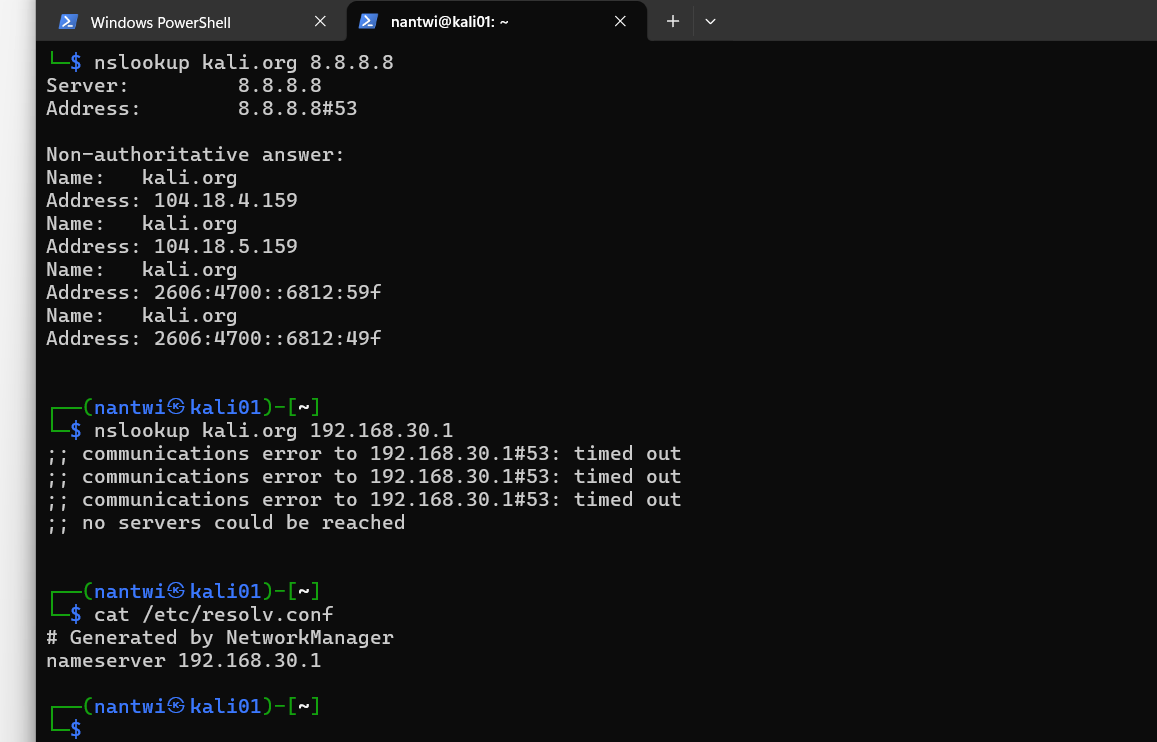
That screenshot is from an earlier episode on another segment. I have kept it here because it is exactly the same move: ask two servers, and let the one that answers tell you where the fault is not.
Back on the scanner, resolvectl status showed the stub pointed at exactly the right place. Correct settings, no answers. Restarting systemd-resolved cleared it. The stub had cached a dead state while pfSense restarted its resolver during my changes, and it kept serving that dead state after pfSense came back.
That produced a different failure, which was progress.
Three words worth knowing
;; ->>HEADER<<- opcode: QUERY, status: SERVFAILEvery DNS reply carries a status, and three of them matter. They point at completely different problems.
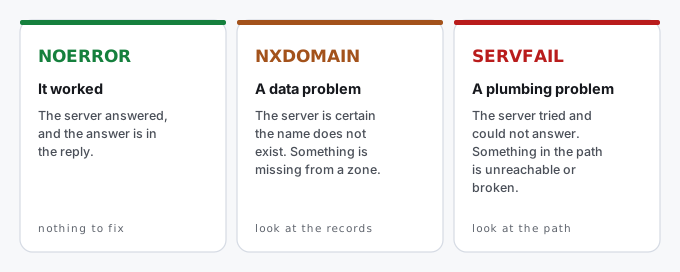
I had SERVFAIL. So the name probably existed, and something on the path was failing.
This is also why dig +short is the wrong tool once something is broken. It hides the status line completely, so “the name does not exist” and “the lookup failed” both come back as the same empty silence. Those need opposite fixes. Drop +short the moment anything is wrong.
The reply came back in 0 milliseconds, which is its own clue. Actually reaching a domain controller and waiting for it costs real time, a few milliseconds at least. Zero means the resolver was handing back a failure it had already cached.
Asking each hop
Rather than guess again, I asked every hop in turn, starting from the far end.
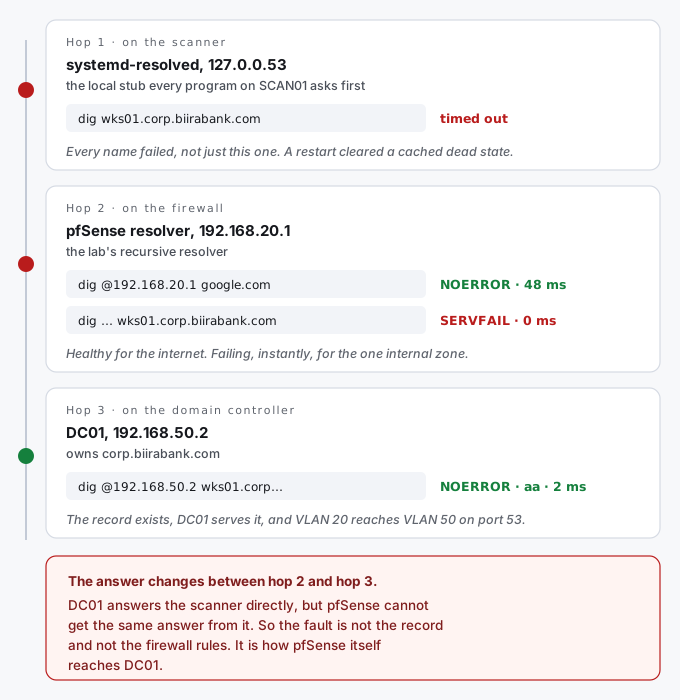
The command that settled it was the last one, asking DC01 directly from the scanner:
dig @192.168.50.2 wks01.corp.biirabank.comNOERROR, the address 192.168.50.56, and the aa flag, which stands for authoritative answer. The domain controller was not repeating something it had heard elsewhere. It owns that domain, and it was speaking for it. Two milliseconds.
DC01’s own view of the record agreed:
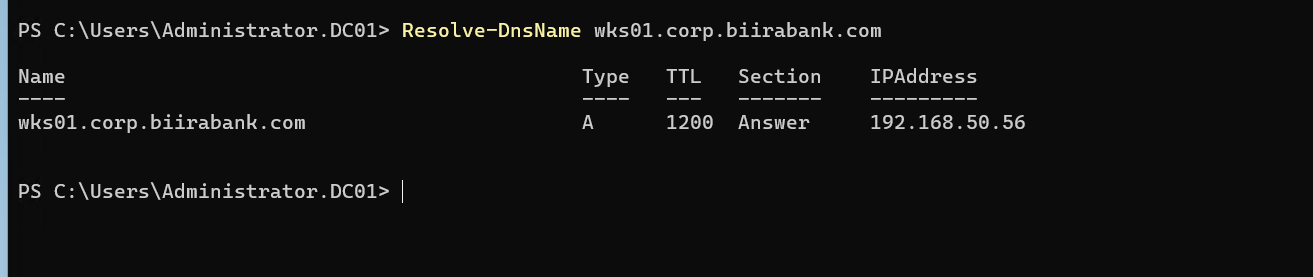
That one lookup from the scanner proved three things at once:
- The record exists. So this was never an NXDOMAIN problem.
- DC01 serves it correctly. So the domain controller was not the problem.
- The scanner can reach DC01 on port 53. So the firewall rules between VLAN 20 and VLAN 50 were not the problem either.
Everything worked when the scanner asked DC01. Nothing worked when pfSense did. The fault had to be in how pfSense itself reaches DC01.
The wrong turn: DNSSEC
My second theory was the DNSSEC options, since that is exactly what they had been guessing at. I opened the resolver settings to confirm.
DNSSEC support was switched off. It had never been on. My pre-emptive fix was solving a problem that did not exist, so those two custom options had been doing nothing the entire time, and my second theory was as wrong as my first.
Worse, they were still sitting there. Configuration that looks meaningful but does nothing is worse than no configuration, because the next person to read that box, including me, will assume it matters.
The actual cause
It was on the same settings page, a few rows up.
Outgoing Network Interfaces: WAN only.
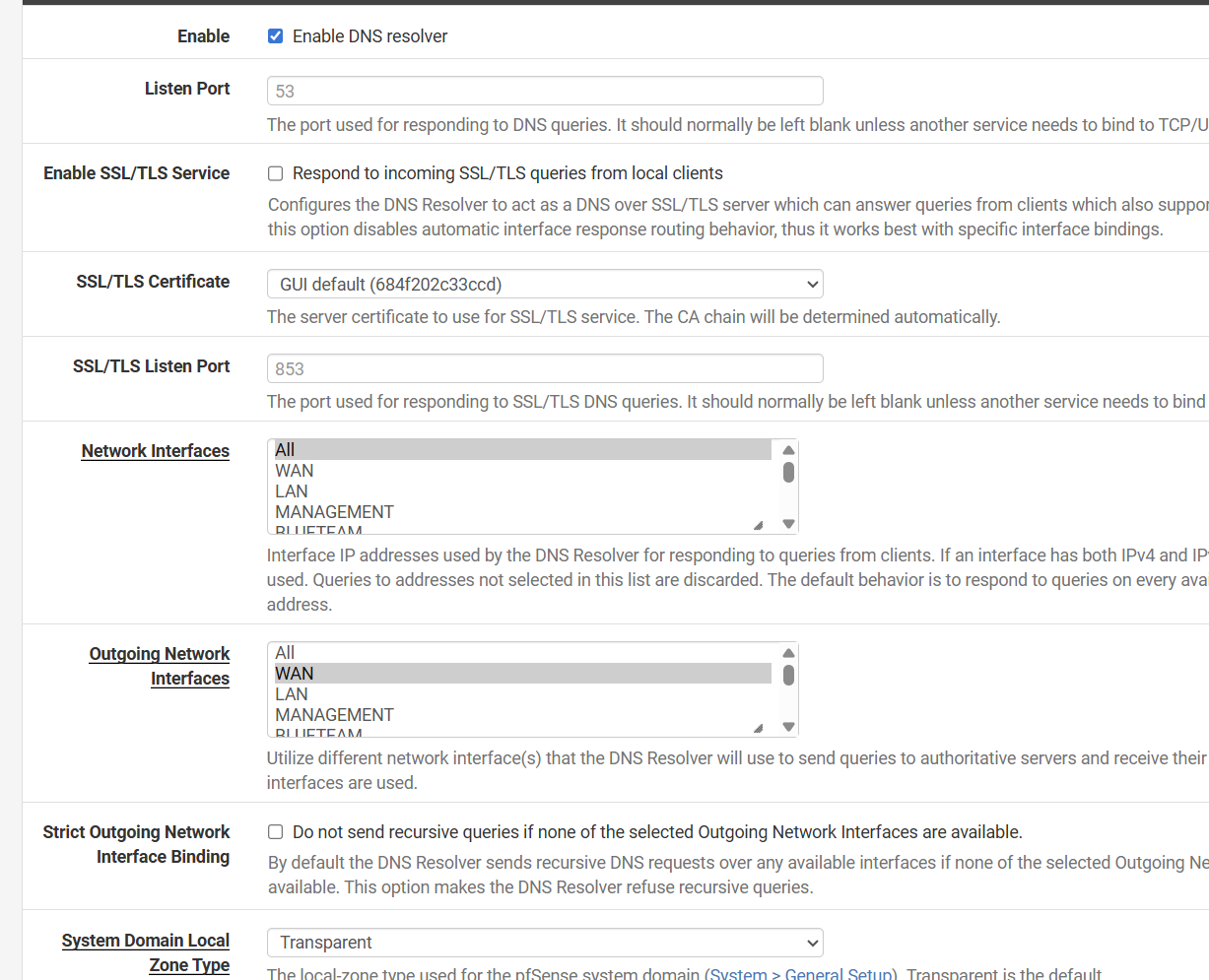
That capture is also from the earlier episode, and that is the point. The field had been sitting on WAN since then, which was correct while every name the lab needed lived on the public internet, and became wrong the moment an internal domain existed.
Two settings on that page look alike and do opposite jobs, so they are worth separating:
| Setting | What it controls | Here |
|---|---|---|
| Network Interfaces | Which interfaces the resolver listens on, so which segments can ask it questions | All. Every segment could ask. |
| Outgoing Network Interfaces | Which interfaces the resolver may send its own questions out of, when it goes to find an answer | WAN only. It could only go outward to the internet. |
Put that on the map. The scanner’s question arrived at pfSense fine, because pfSense listened everywhere. pfSense then needed to take hop 3 to DC01, which sits behind an internal interface. But it was only allowed to send out of WAN. It could reach the entire internet, which is why every public name worked, and it could not reach its own domain controller.
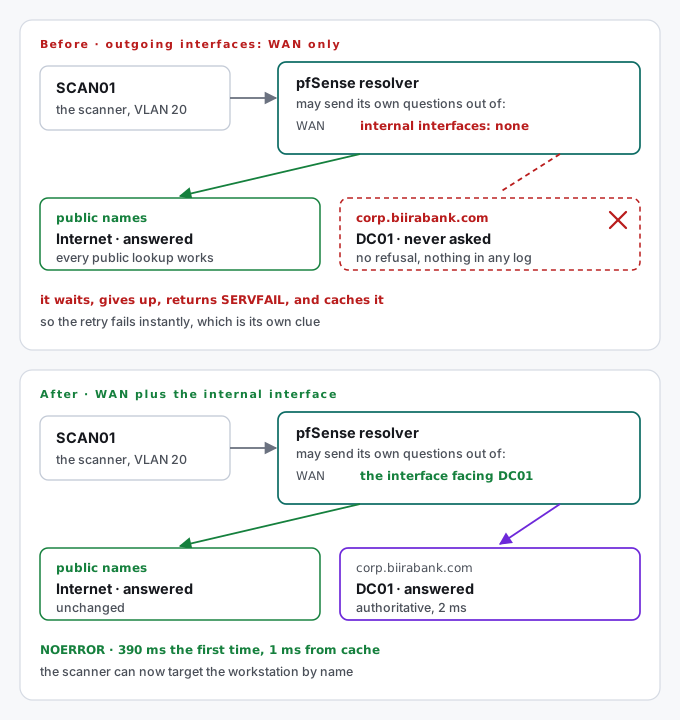
Every symptom lines up with that one setting:
- One domain fails while everything else works. Only the internal domain needed an internal interface.
- The first attempt hangs, and the retry fails instantly. The resolver waited, gave up, and cached the failure.
- Nothing in any log says “refused”. Nothing was refused. The packets were never sent.
The fix was to add the internal interface that faces the domain controller’s segment. Deliberately not “All”: the resolver has no business sending questions into the RedTeam segment or anywhere else without a DNS server in it. Two interfaces, one for each job it actually has.
dig wks01.corp.biirabank.comNOERROR, 192.168.50.56, 390 milliseconds. Then the same lookup again: 1 millisecond, with the time to live counting down from 1200. The first lookup took the full trip to DC01. The second came from the resolver’s cache. Both correct.
Proof it holds
The whole point was for the scanner to reach the workstation by name. Later that evening, before the first credentialed scan, I tested exactly that from SCAN01:
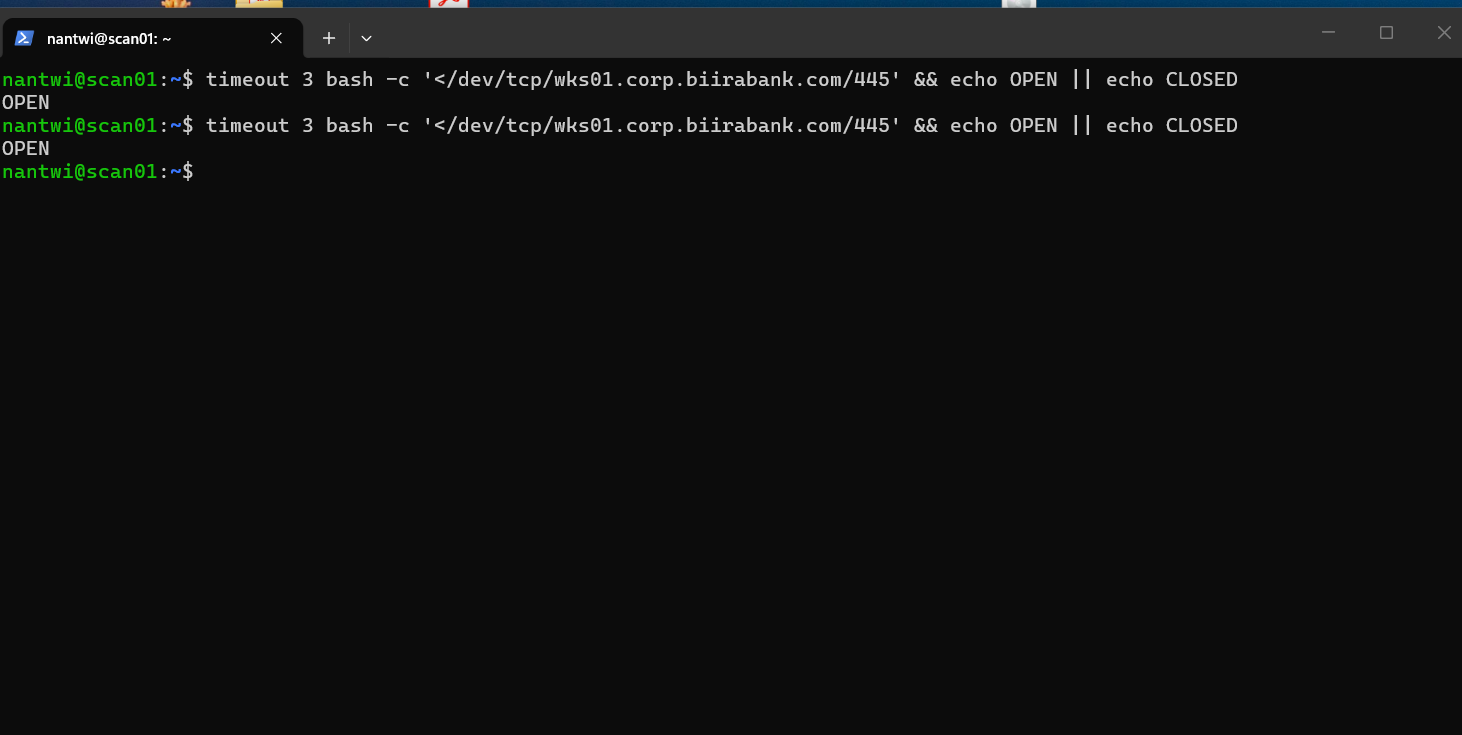
The name resolves, the route works, and the port answers. That one line depends on every hop in this note being correct.
A checklist for the next time one domain fails
When one domain fails and everything else works, this is the order I would go in now:
- Ask the authoritative server directly.
dig @<its address> <name>. If it answers withaa, the record and the server are fine, and you can stop looking at them. - Ask your resolver directly, twice. Once for a public name and once for the failing name. If the public name works and the failing one does not, the resolver is healthy and the problem is its path to that one domain.
- Read the status, never
+short. NXDOMAIN sends you to the records. SERVFAIL sends you to the path. - Look at the time. Zero milliseconds on a failure means a cached failure, not a fresh attempt.
- On pfSense, check two things. That the Domain Override points at the right server, and that Outgoing Network Interfaces includes an interface that can actually reach it.
- Change one thing, then test again.
What I took from it
One zone failing while everything else works is a very specific symptom. It almost never means the resolver is broken. It means that zone has its own path, and something on that path is wrong: the signpost, the server it points to, or the route to that server.
Ask each hop yourself. Stub, then resolver, then the authoritative server. The hop where the answer changes is the hop that is broken.
Listening and sending are different settings. A resolver that anyone can ask may still be unable to go and find the answer.
Change one thing at a time. I applied an override and two custom options together, then spent twenty minutes unsure which had caused the outage. It was neither, but I could not know that.
Do not fix problems you have not confirmed. The DNSSEC options were a reasonable guess that turned out to do nothing, and they left misleading configuration behind. A guess that costs nothing to apply still costs something to leave in place.
Targets should be names when addresses can move. All of this existed so a scan would not be pinned to a DHCP address. The name now resolves when the scan runs, so the day that lease changes, nothing breaks and nobody has to notice.
