Find, Fix, Prove: Closing the First Finding
Contents
A vulnerability report is a list. It tells you what was wrong on one day. It says nothing about whether anyone did anything about it.
Vulnerability management is the loop around the list: scan, choose, fix, scan again, and show the finding closed. This note is the first time I went all the way round that loop in my lab. The fix itself was four registry values. Proving it took three scans.
The setup: who does what
Four machines, each with one job.
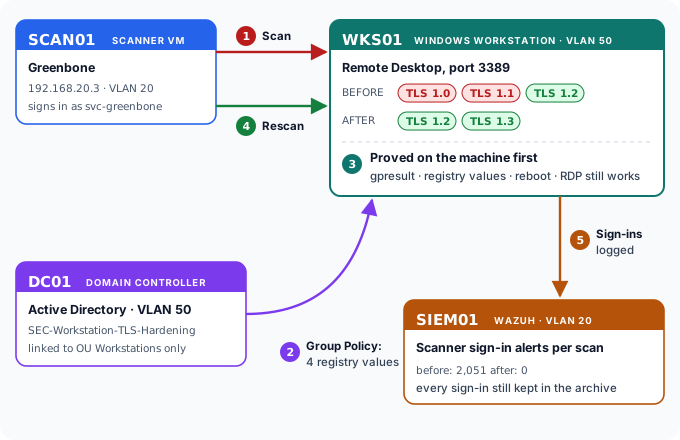
| Machine | Where it sits | Its job in this story |
|---|---|---|
| SCAN01 | VLAN 20, 192.168.20.3 | The Greenbone scanner. It signs in to the workstation to look inside it. |
| WKS01 | VLAN 50 | The first member workstation in the corp.biirabank.com domain, and the target. |
| DC01 | VLAN 50 | The domain controller. The fix is delivered from here, by Group Policy. |
| SIEM01 | VLAN 20 | Wazuh. It watches the scanner sign in, which matters at the end. |
Three scans of one machine
| Scan 1 | Scan 2 | Scan 3 | |
|---|---|---|---|
| Date | 13 September | 20 September | 29 September |
| Signed in to the target | No | Yes | Yes |
| TLS 1.0 and 1.1 on Remote Desktop | found | found | gone |
| High / Medium / Low | 0 / 2 / 1 | 1 / 3 / 1 | 1 / 2 / 1 |
The first scan could not get inside the machine. Its credentials were broken, and it reported four applications and no vulnerabilities on a live Windows workstation, which is impossible. Once the scanner could sign in, the picture changed.
Choosing what to fix
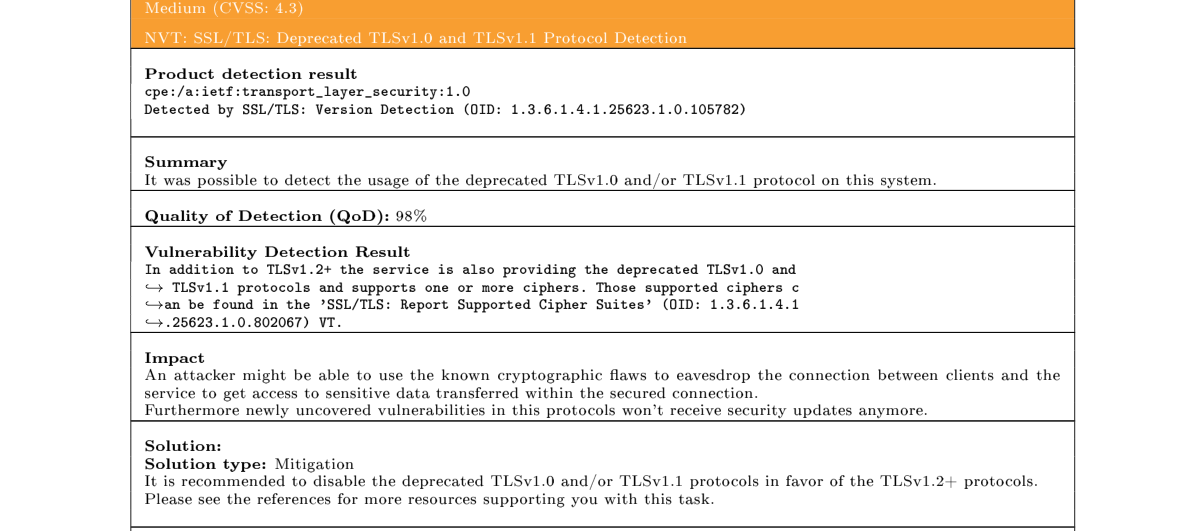
The finding I fixed first was not the highest score on the report, and that was deliberate.
A CVSS score tells you how bad a weakness could be in general. Triage decides what it means on this machine. Several results above this one were raised by a file that ships with every copy of Windows and that the vendor will never change, or by information the scanner reported cautiously. Each of those has a recorded decision of its own.
Deprecated TLS was the right first fix because it was:
- Real. Confirmed by a handshake, not inferred.
- My own configuration. Not a product bug waiting on a vendor.
- Fixable by policy. So the fix reaches every workstation, not one.
- Provable. A rescan can show the old versions gone, which is what closes the loop.
What was wrong, in plain terms
When you connect to Remote Desktop, the session is protected by TLS. Your computer and the server agree on the highest version both of them support. TLS 1.0 and 1.1 have known weaknesses and are formally retired. A modern client never needs them. Their only real use is to an attacker in the middle of the connection, trying to push it down to the weakest version both sides will still accept.
Switching them off on the server costs a modern client nothing. The two sides simply settle on TLS 1.2, as they already did.
The fix, delivered by Group Policy
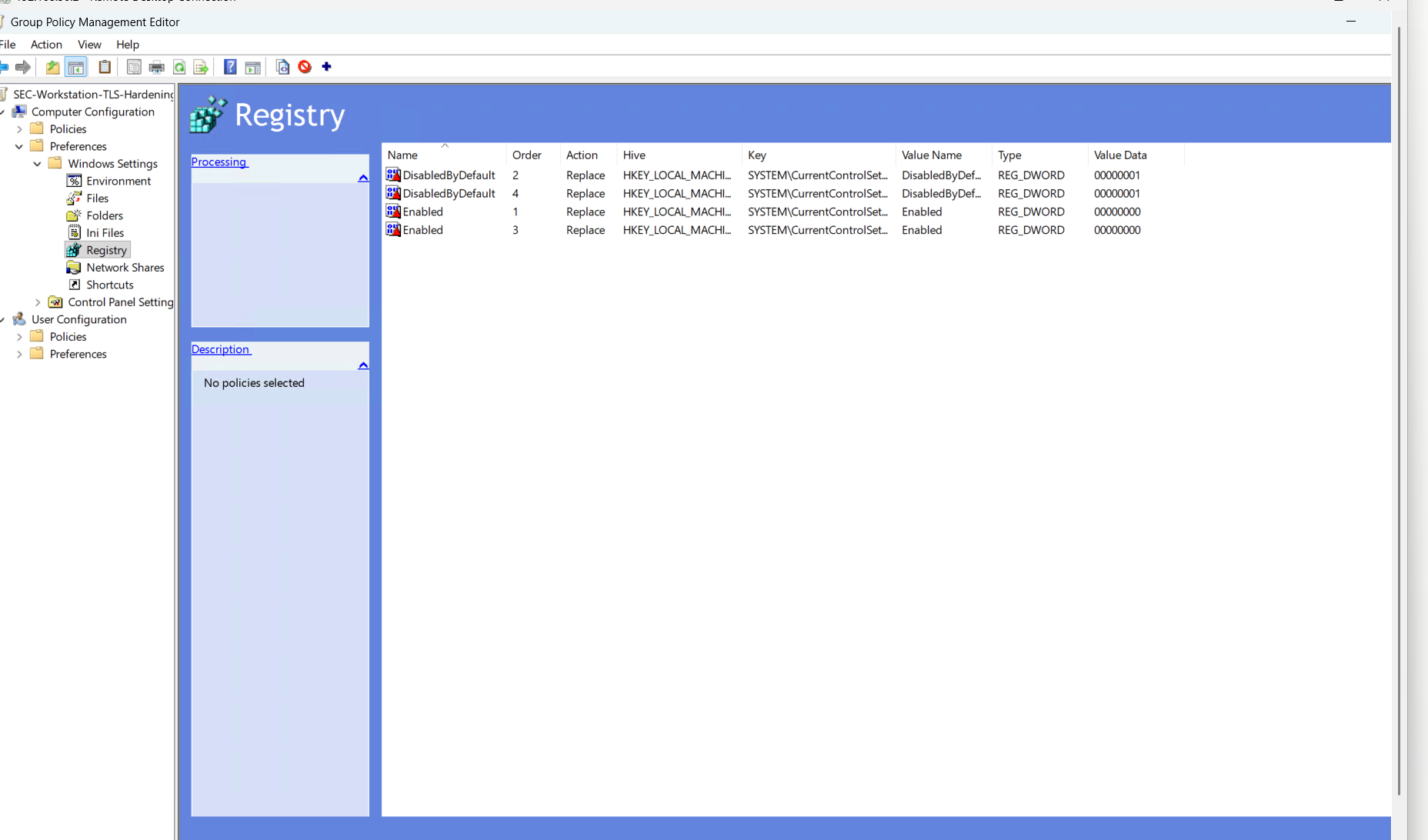
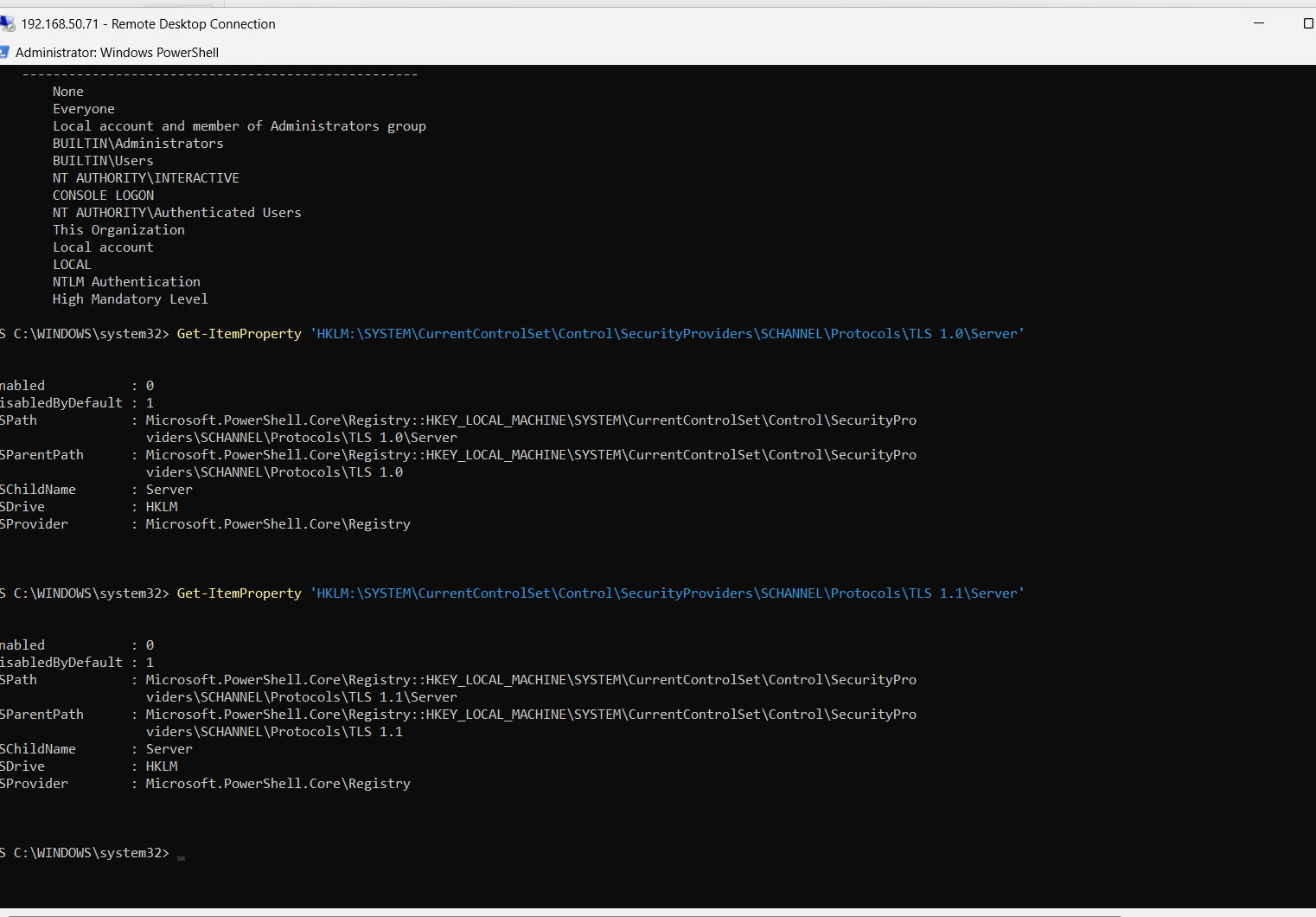
On Windows, TLS is provided by a component called SCHANNEL, and its on and off switches live in the registry, under ...\SCHANNEL\Protocols\<version>\Server. The Server part matters: it governs connections coming in to the machine, which is what the scanner tested on port 3389. Each version takes two values: Enabled = 0 switches it off, and DisabledByDefault = 1 stops it being offered to software that asks for “the defaults”.
I did not set those by hand. They went into a new Group Policy object on DC01, SEC-Workstation-TLS-Hardening, with one job, kept separate from the policy that gives the scanner its access. If Remote Desktop ever misbehaves, this one policy can be unlinked without touching anything else.
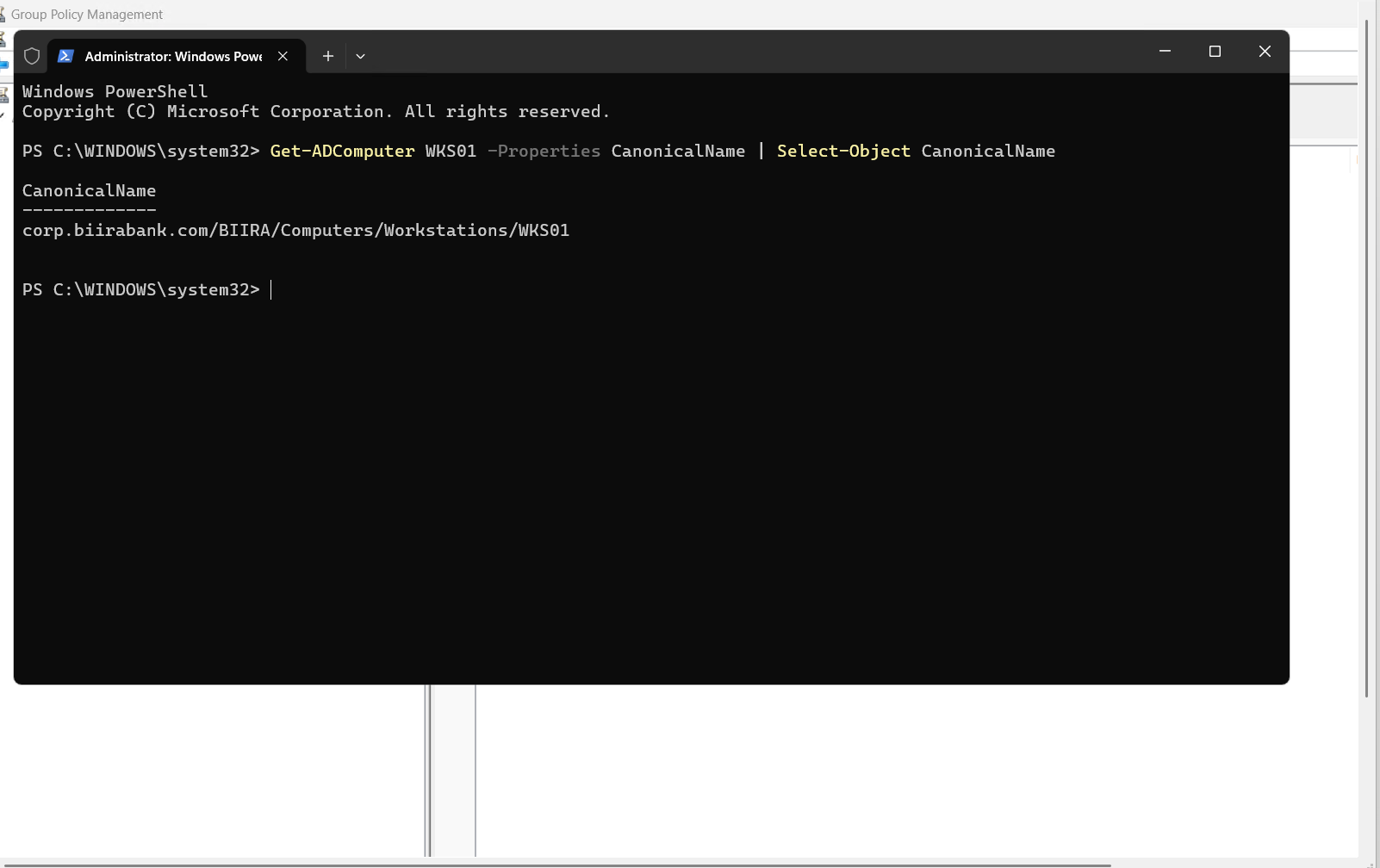
Scope was checked, not assumed. My first link went to BIIRA/Computers, which holds both servers and workstations, so the change would have reached servers that had never been assessed. Before moving the link I asked the directory where WKS01 actually lives.
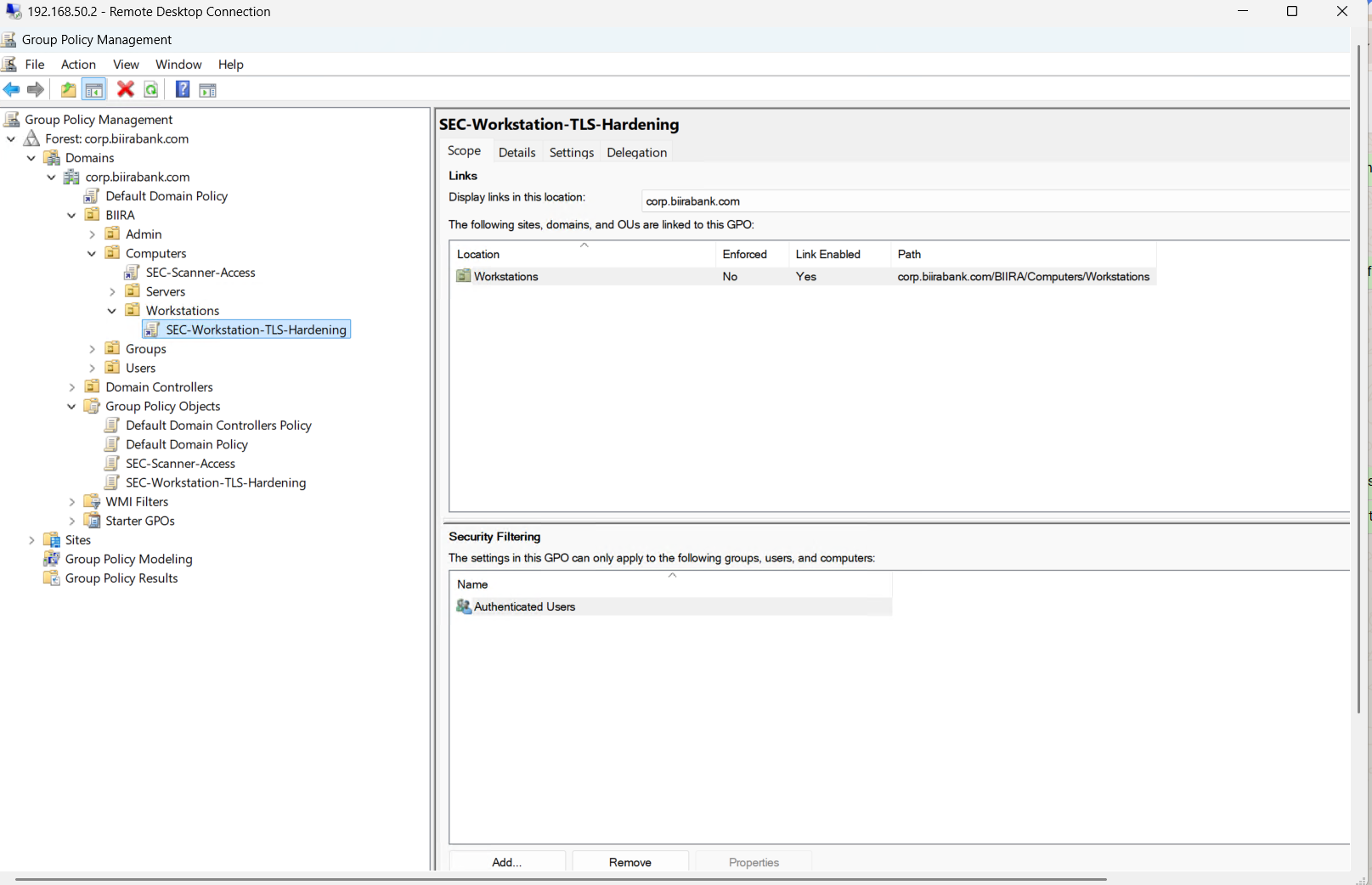
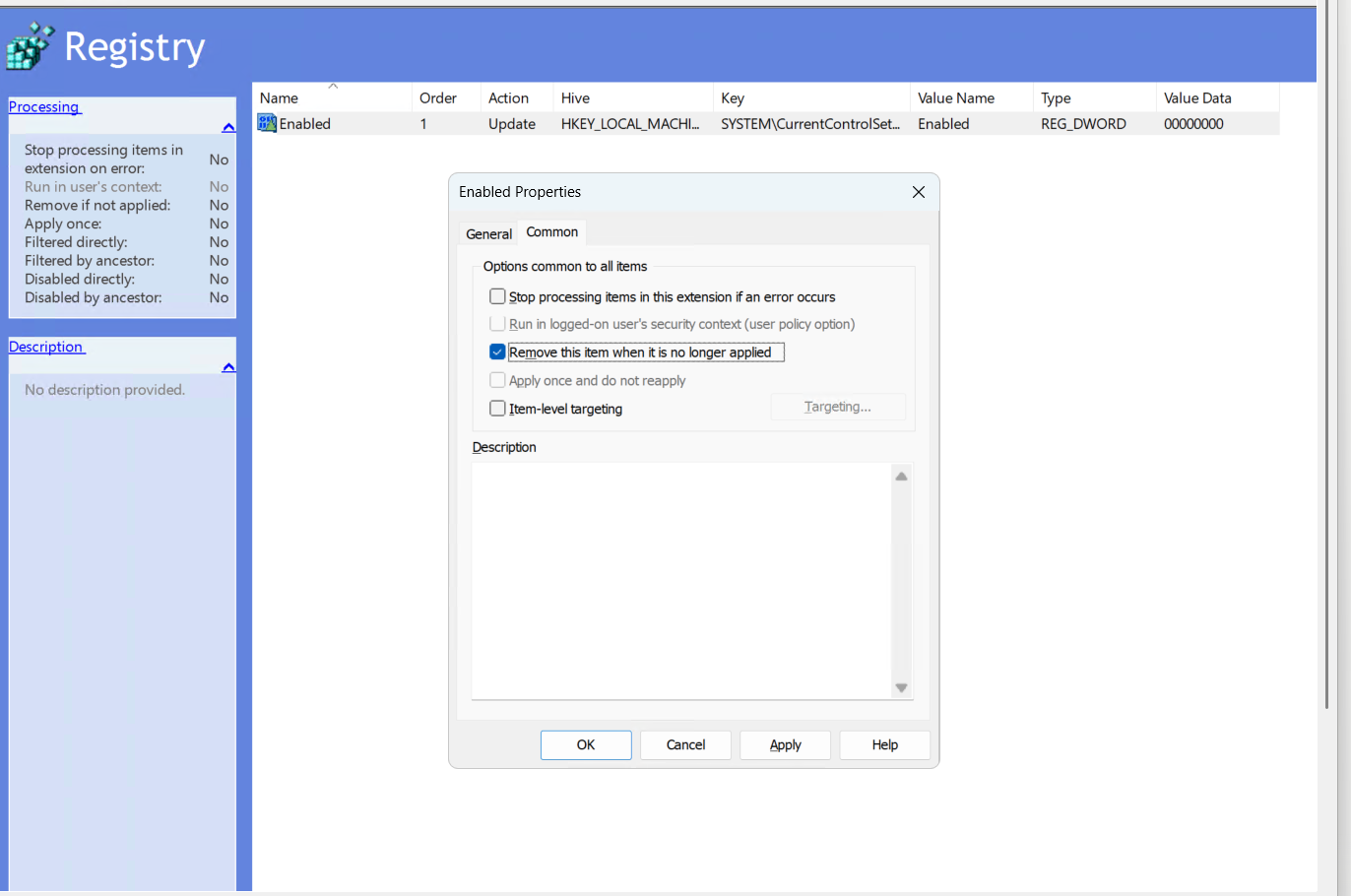
The way back was built into the change. Each registry item has an option called “Remove this item when it is no longer applied”. With it ticked, unlinking the policy deletes the values from every machine it reached. Without it, the values stay behind after the policy is gone, and nobody can cleanly undo the change.
Proving it on the machine, before any rescan
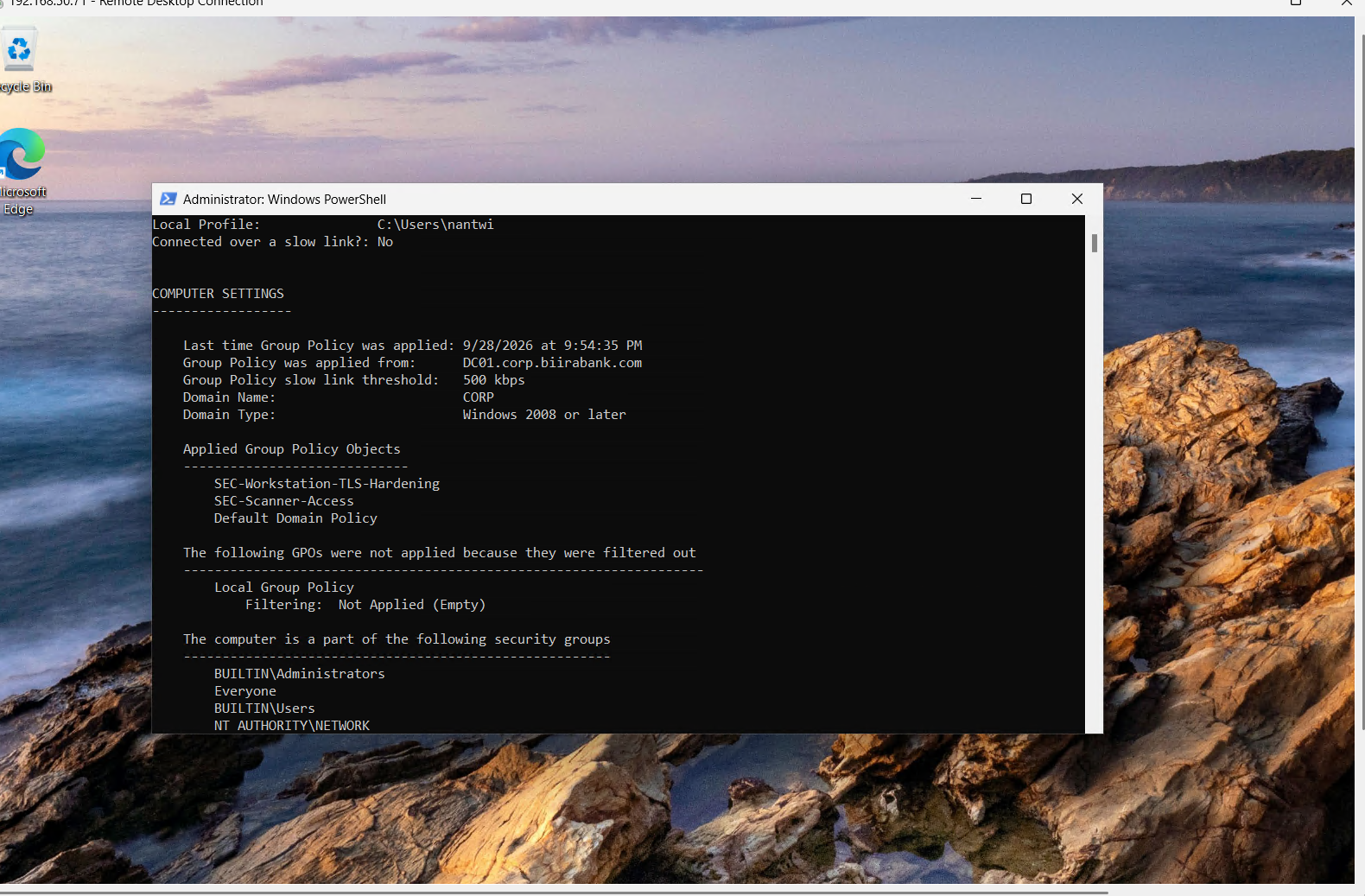
A policy shown in the management console proves the policy exists. It does not prove a machine applied it. So I checked each claim separately, on WKS01 itself.
The policy arrived.
The values were written.
Then a reboot. SCHANNEL only reads these settings when Windows starts. Until the restart, the values sit in the registry and the running service still offers the old versions. Skip the restart and the “fixed” finding comes straight back on the next scan.
Then the cheapest test of all. My prediction was that Remote Desktop would keep working, because both sides would agree on TLS 1.2. After the restart I connected again and it worked. The fix did not break the service it hardened.
Proving it worked: the third scan
The same scan task ran again, with the same target, credential and configuration. The only intended difference between scan two and scan three was the policy.
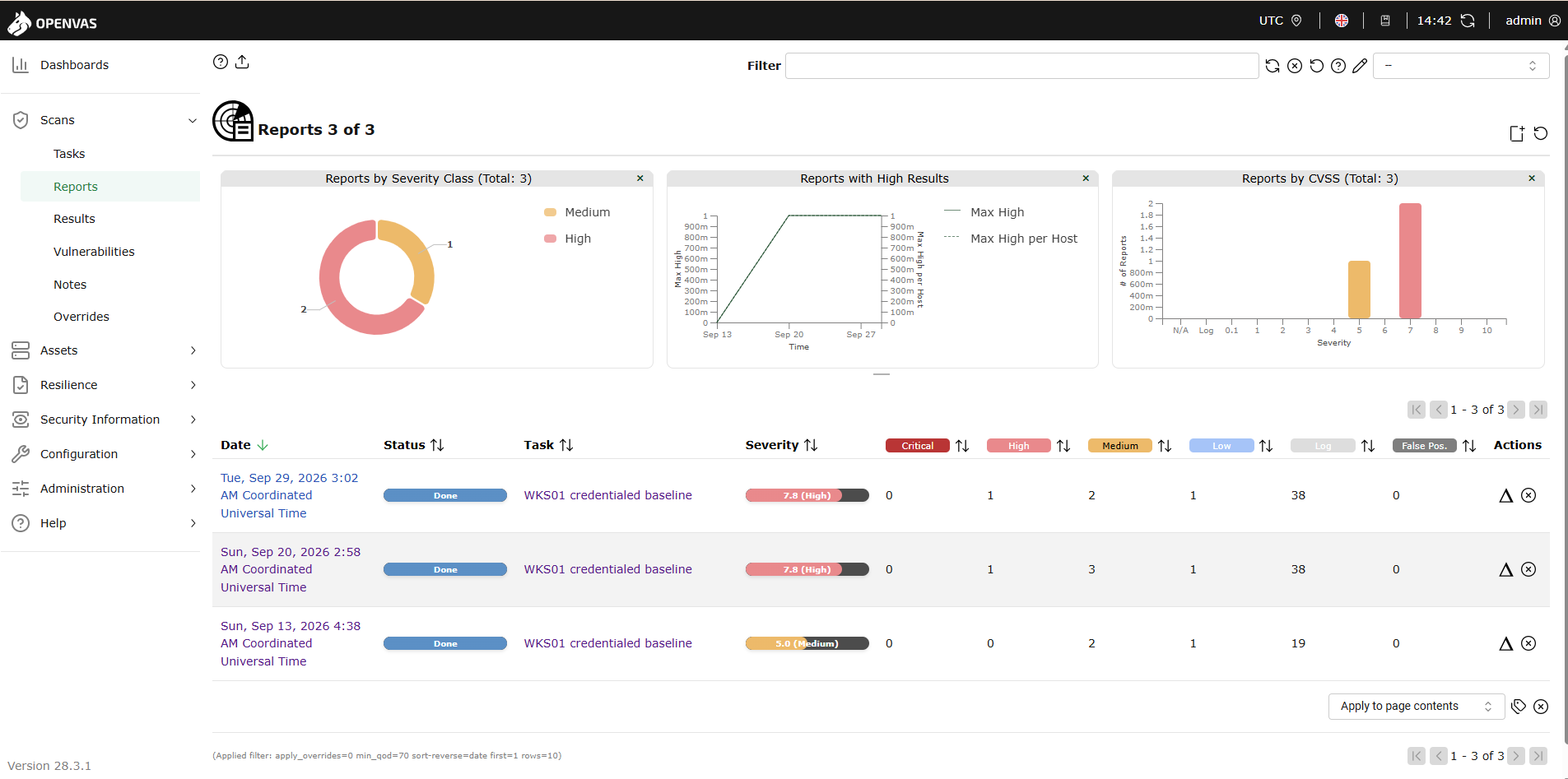
The finding was closed from three directions, which is stronger than any one of them:
- It is absent. The deprecated TLS result no longer appears. Medium results fell from three to two and nothing else changed, which is what a targeted fix should look like.
- The positive evidence. The scanner’s own list of supported versions now shows TLS 1.2 and TLS 1.3 only.
- An independent check agrees. A separate test tried to open a TLS 1.0 connection and could not.
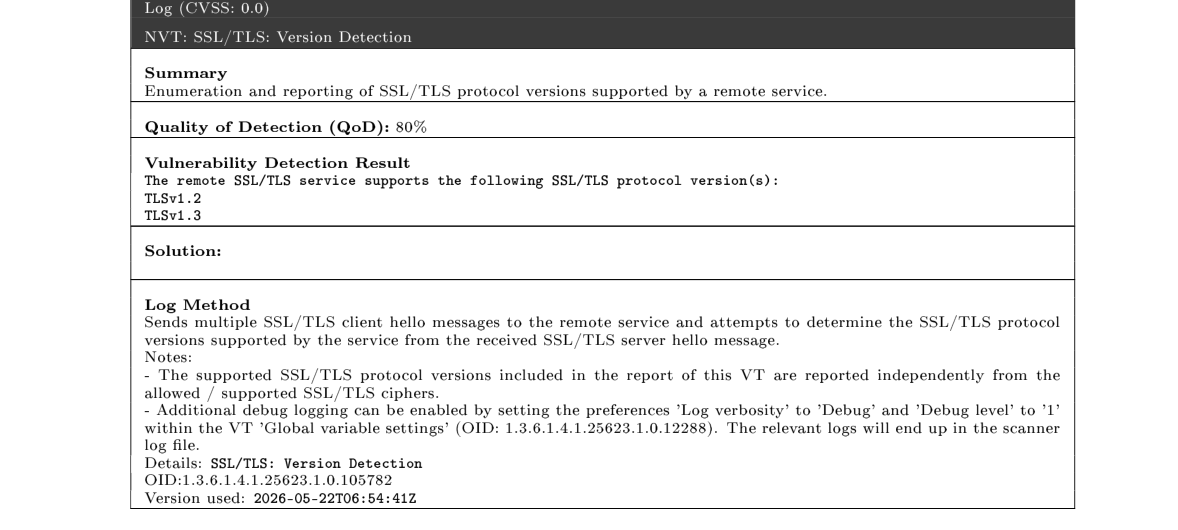
A missing finding on its own could mean the check never ran. A missing finding, plus a list of what is supported, plus a separate test failing to connect on the old version, cannot.
What the same scan proved about the SIEM
The rescan was also the first real test of the Wazuh rules from The Alert That Cried Wolf. On the previous scan, the scanner signing in again and again raised 2,051 “possible pass-the-hash” alerts. During this one it raised none, while the archive still recorded every sign-in.
The finding I left alone
Report three had one more thing worth explaining: a few checks that timed out.
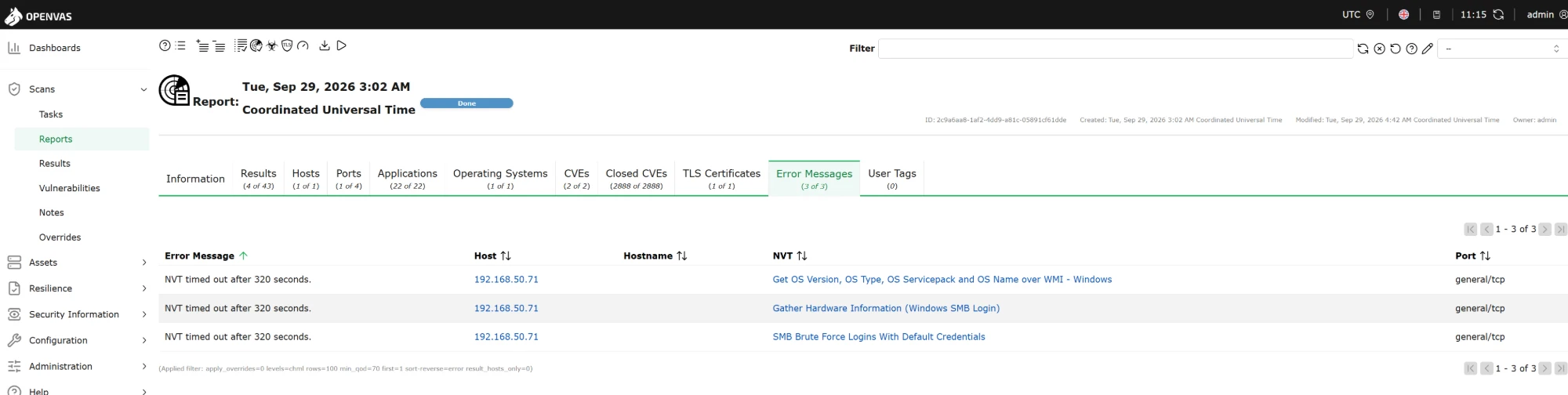
The scanner reaches a Windows machine two ways. SMB, on port 445, which I opened to the scanner alone, carries the registry reads that do the real work. WMI answers first on port 135 and then moves the conversation to a random high port, which I never opened. So every WMI check waits at a closed door and gives up.
I could open it. I decided not to.
| SMB only (chosen) | SMB and WMI | |
|---|---|---|
| What the scan account can do | Read the registry and files | Also start processes on the machine |
| If its password is stolen | A reader of every workstation | A way to run commands on every workstation |
| Coverage | Everything needed to match vulnerabilities; a few inventory checks time out | Those checks complete |
A scan credential is the most widely trusted secret on a network, because by design it can sign in everywhere. It should carry the least power the scan actually needs. So the timeouts are expected, recorded, and not something to chase on every future report. Leaving a result alone on purpose, with the reason written down, is also part of the loop.
What I took from it
- A finding is closed by evidence, not by a change. Making the change was the smallest part. Showing it arrived, took effect, broke nothing and disappeared from an independent scan is what closes it.
- Severity ranks what could be bad. Triage decides what matters here.
- Written is not in force.
gpresultproves the policy arrived, the registry proves the values were written, and only a restart puts SCHANNEL settings into effect. Three claims, three checks. - Confirm scope from the directory, not from memory. One command showed my first link would have reached the servers.
- Build the way back into the change. Without “remove when no longer applied”, the only safe change is one you never need to undo.
The full chapter, with every screenshot and the control mapping, is chapter 21 of the homelab runbooks. The scanner and the account it signs in with are explained in A Scanner That Is Not a Domain Admin.
