The Alert That Cried Wolf
Contents
The highest severity Wazuh has is level 15. One of my rules was firing at it several times an hour, on every Windows machine in the lab, tagged with a MITRE technique that means an attacker is bringing tools onto the host.
Nothing was wrong. This note is about how I proved that, how I silenced it without blinding myself, and what I had to switch on so that silencing it stayed honest.
The setup: where this happens
Two kinds of machine matter here, and one pipeline.
| Machine | Where it sits | Its job in this story |
|---|---|---|
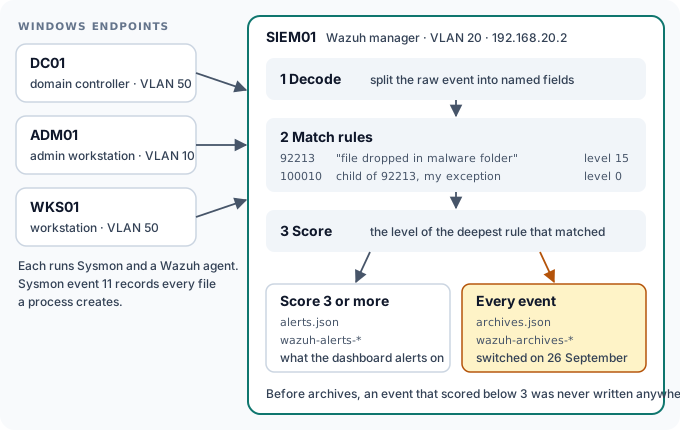
| DC01, ADM01, WKS01 | VLAN 50 and VLAN 10 | The three Windows endpoints. Each runs Sysmon, which records process and file activity, and a Wazuh agent that ships those records out. |
| SIEM01 | VLAN 20, 192.168.20.2 | The Wazuh manager. It decides what each event means and whether it deserves an alert. |
| SCAN01 | VLAN 20, 192.168.20.3 | The Greenbone vulnerability scanner. It turns up halfway through. |
The pipeline inside SIEM01 has three steps. Decode splits a raw event into named fields, such as the process name and the file path. Match runs the event through the rules; a rule can have child rules that refine it. Score takes the level of the deepest rule that matched. Anything scoring 3 or more becomes an alert. Everything else, by default, is thrown away. That last sentence comes back at the end.
The alert
While reviewing the dashboard on 25 September I found this. Sysmon event 11 means “a file was created”. Here, powershell.exe had written a .ps1 script into a temporary folder.

The rule that fired is what made me stop.
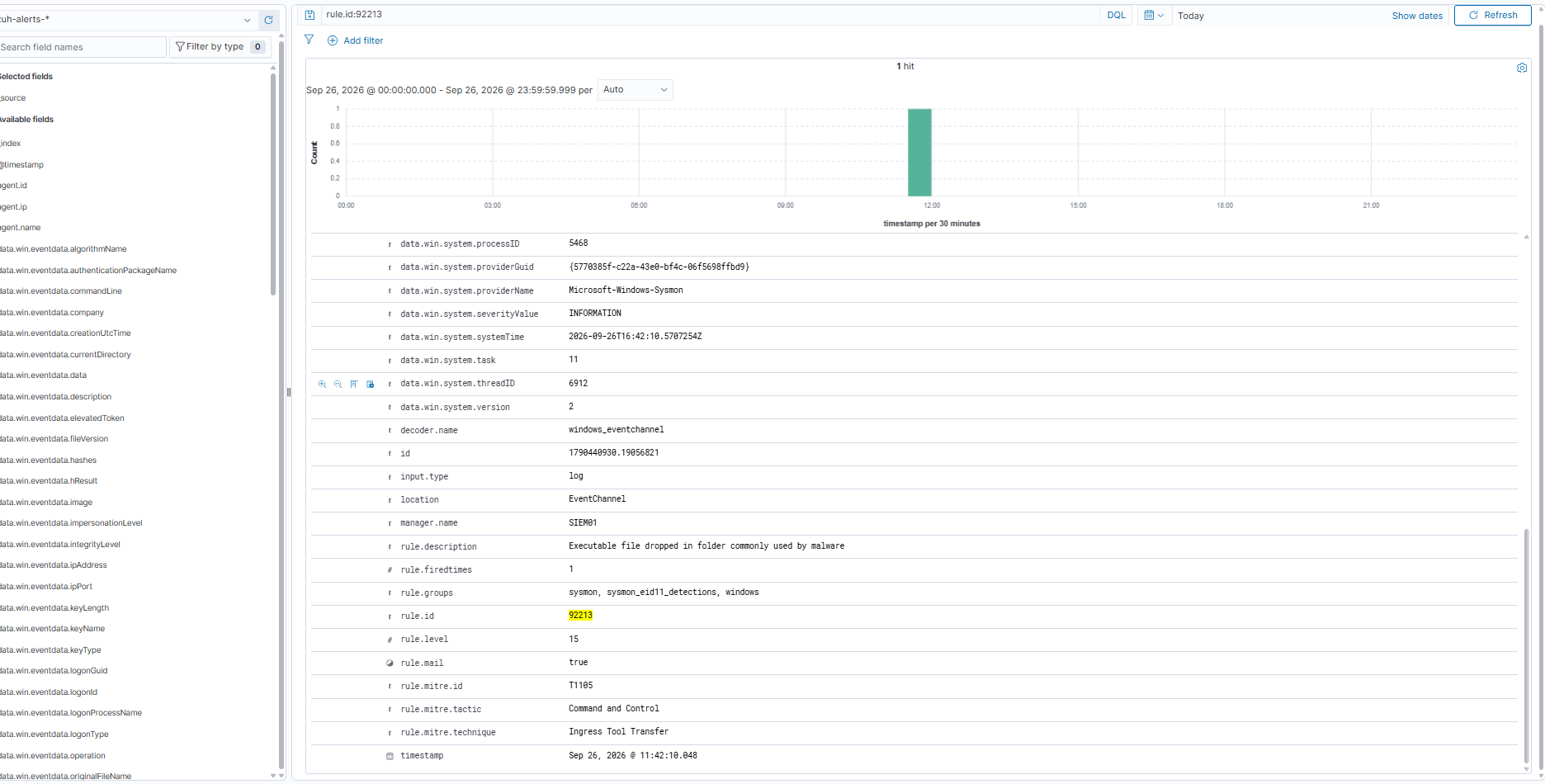
Rule 92213 is one of Wazuh’s built-in Sysmon detections. In plain terms: if a program or script appears in a folder that malware likes to use, alert at the top of the scale. That is a sound rule. Attackers really do stage their tools in temporary folders.
The rule was not wrong
What the rule cannot know is that Windows does the same thing to itself.
Before PowerShell runs a script or loads a module, it has to check the execution policy: is a script from here allowed to run? That check is defined in terms of files, so PowerShell answers it by writing a real one. It drops a throwaway .ps1 into the temporary folder, asks the policy whether it may run, reads the answer, and deletes it. It takes milliseconds and happens constantly.
The names give it away. They always look like this:
__PSScriptPolicyTest_4plyckik.y11.ps1
__PSScriptPolicyTest_fwonwlyt.yzn.ps1
So the event was real, the rule’s description was accurate, and the activity was harmless. That is what a false positive usually is: not a broken rule, but a rule meeting a case its author did not plan for.
It still had to be fixed, because of what it does to the person reading the alerts. A level 15 alert that fires all day teaches you to stop reading level 15, and then the rule fails at its only job.
The fix, and the fix I refused to write
The fix is a child rule at level 0. It only runs after rule 92213 has already matched, and level 0 means “match this, then raise nothing”.
<rule id="100010" level="0">
  <if_sid>92213</if_sid>
  <field name="win.eventdata.targetFilename" type="pcre2">(?i)__PSScriptPolicyTest_[a-z0-9]{8}\.[a-z0-9]{3}\.ps1$</field>
  <field name="win.eventdata.image" type="pcre2">(?i)powershell(_ise)?\.exe$</field>
  <description>Sysmon 11: PowerShell execution policy probe file. Expected, not alerted.</description>
</rule>
Rule 92213 itself is untouched and still enabled. I added one exception, and the exception has two conditions, not one. This is the most important decision in the whole piece of work.
An exception on the file name alone would be a hole in the loudest rule in the lab. Name your payload __PSScriptPolicyTest_aaaaaaaa.bbb.ps1 and walk straight through. Requiring that the program writing the file is also powershell.exe closes most of that gap. The leftover risk, an attacker using PowerShell itself to write a file shaped exactly like the probe, is accepted and written down in the chapter rather than left unsaid.
| Event | Alerts? |
|---|---|
| PowerShell writes its execution policy probe | No |
| Any other file dropped in the same folder | Yes, level 15 |
| A file named like the probe, written by anything else | Yes, level 15 |
Two failures that made no sound
My first version of rule 100010 would never have fired. Neither mistake produced an error. A rule that does not match simply does nothing, forever.
The paths had doubled backslashes. I ran a real event through wazuh-logtest, the tool that shows you exactly how the manager decodes an event. The path arrived as C:\\Windows\\SystemTemp\\__PSScriptPolicyTest_fwonwlyt.yzn.ps1. Those are two real backslashes, not a quirk of the display. My pattern, written with single backslashes, matched nothing.
The probe lives in more than one folder. The same test showed C:\Windows\SystemTemp, the temporary folder of the SYSTEM account, where my first example had come from a user’s AppData\Local\Temp. Pinning the pattern to a folder was wrong both ways.
One fix solved both: match on the part of a Windows path that has no separators in it. The final rule contains no backslashes at all, which is why it ends at the file name.
The scanner needed the opposite shape
The same week, my first credentialed vulnerability scan had produced a different kind of noise. SCAN01 signs in to every Windows machine it checks, as a service account called svc-greenbone. Rule 92652 reads a successful NTLM network sign-in as a possible pass-the-hash attack. One scan, one hour, 2,051 alerts.
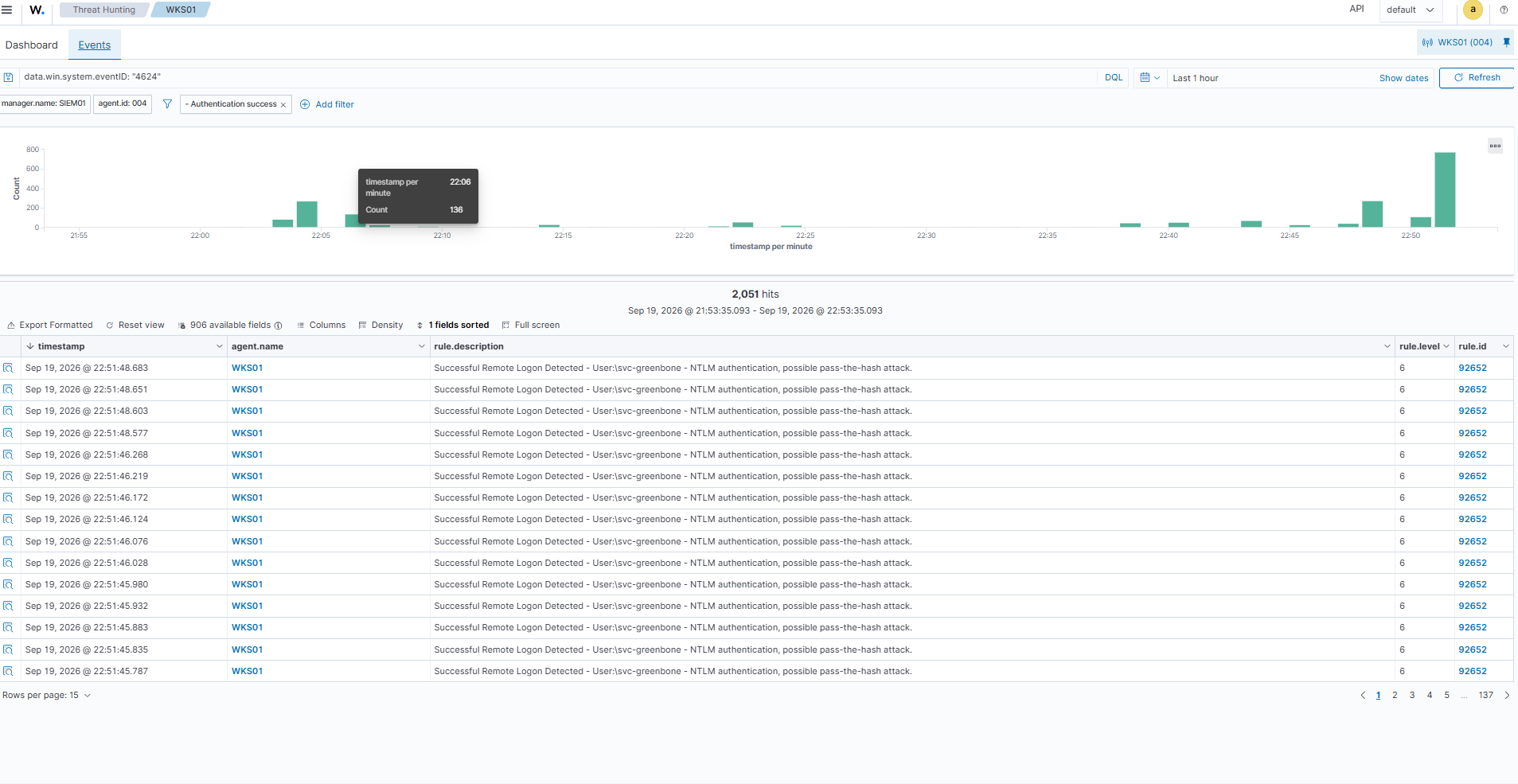
Again the rule was right to fire. The fix needed the opposite shape from the PowerShell one, because the question is no longer “is this harmless?” but “is this coming from where it should?”.
| Rule | Level | Matches |
|---|---|---|
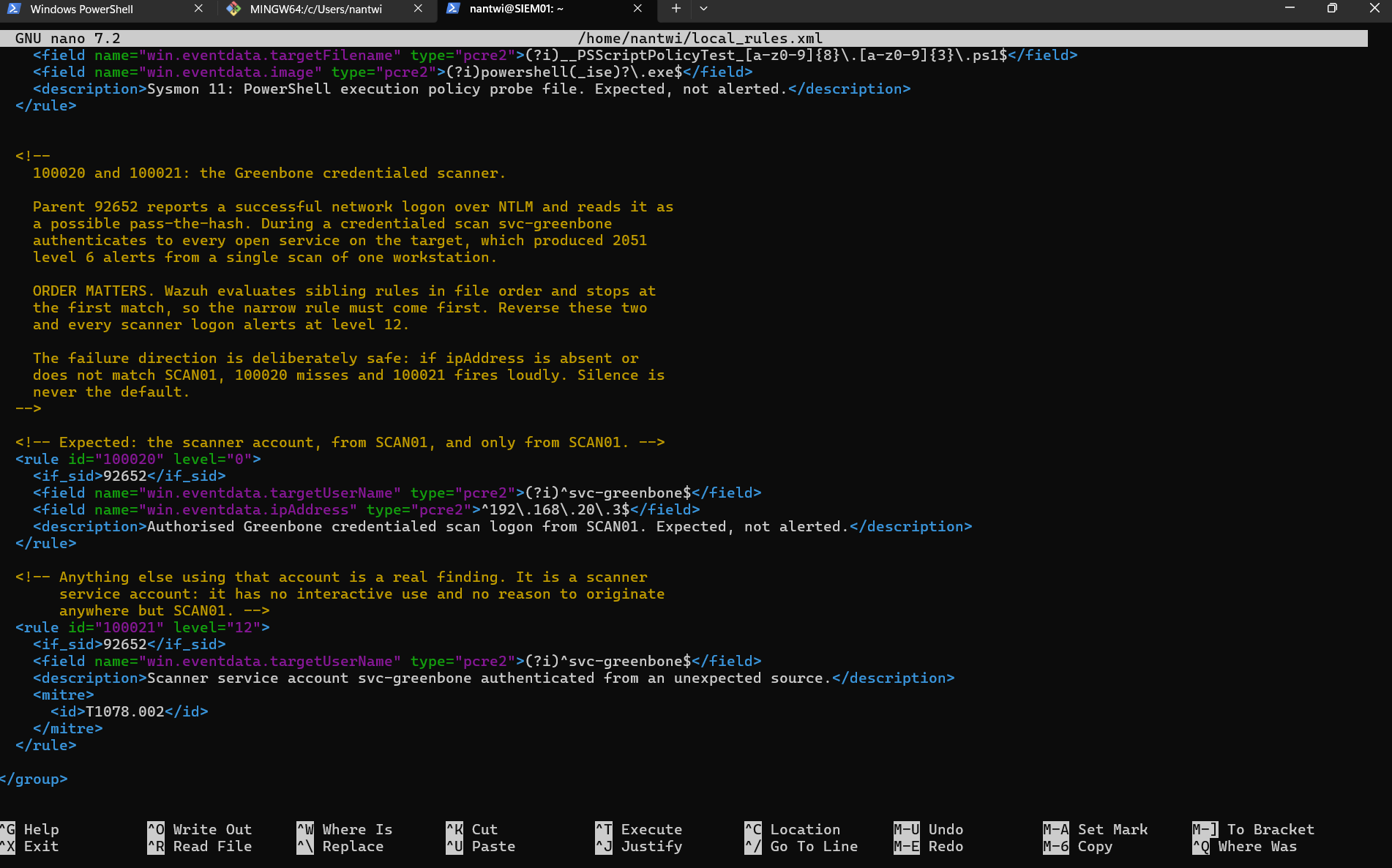
| 100020 | 0 | svc-greenbone signing in from 192.168.20.3, which is SCAN01 |
| 100021 | 12 | svc-greenbone signing in from anywhere else, mapped to MITRE T1078.002 |
This is where tuning gives back more than it takes away. The scanner account is denied every interactive way of signing in, and has no reason to come from anywhere except SCAN01. Before, its use was buried in two thousand identical alerts. Now normal use is silent and anything else is louder than it ever was.
Order matters. Wazuh tries sibling rules in the order they appear and stops at the first match, so 100020 has to come before 100021. The failure is also safe on purpose: if the address is missing or wrong, the silent rule misses and the loud one fires. Silence is never the default.
Deploying it, and the deployment that was not
The rules live in the lab’s public repository, in detections/wazuh/local_rules.xml, and SIEM01 pulls them from there. The repository holds the reasoning and the history; the SIEM holds a copy.
My first attempt was not deployed at all, and I believed it was.

The second attempt checked every step.
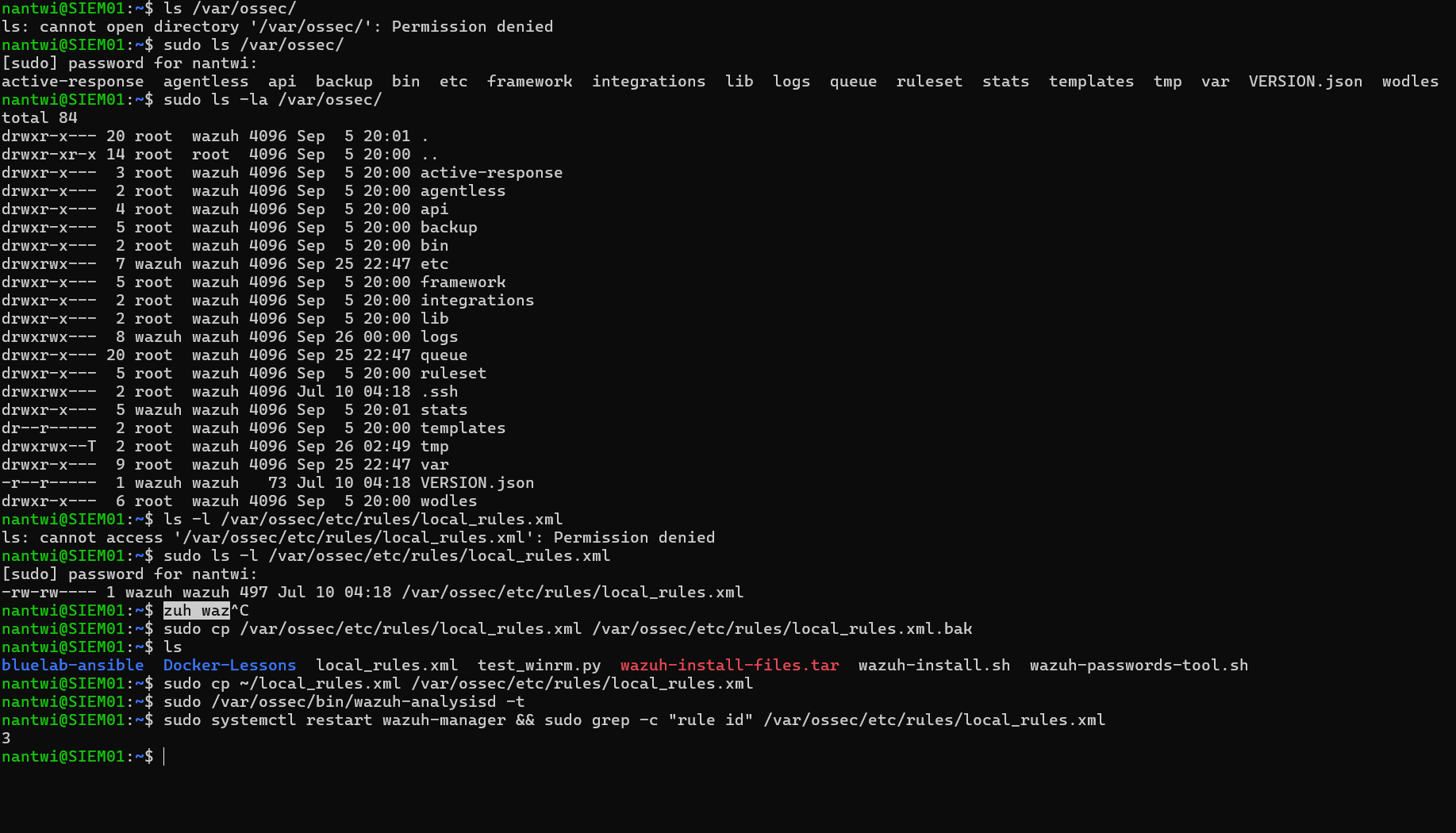
Two details in that sequence matter. wazuh-analysisd -t validates the rules before the restart, and it is not optional: a typo in local_rules.xml does not break one rule, it stops the whole SIEM from starting. And the file went in with cp, not mv. Copying onto an existing file keeps its owner and permissions. Moving would have replaced it with a file the Wazuh service could not read.
The proof
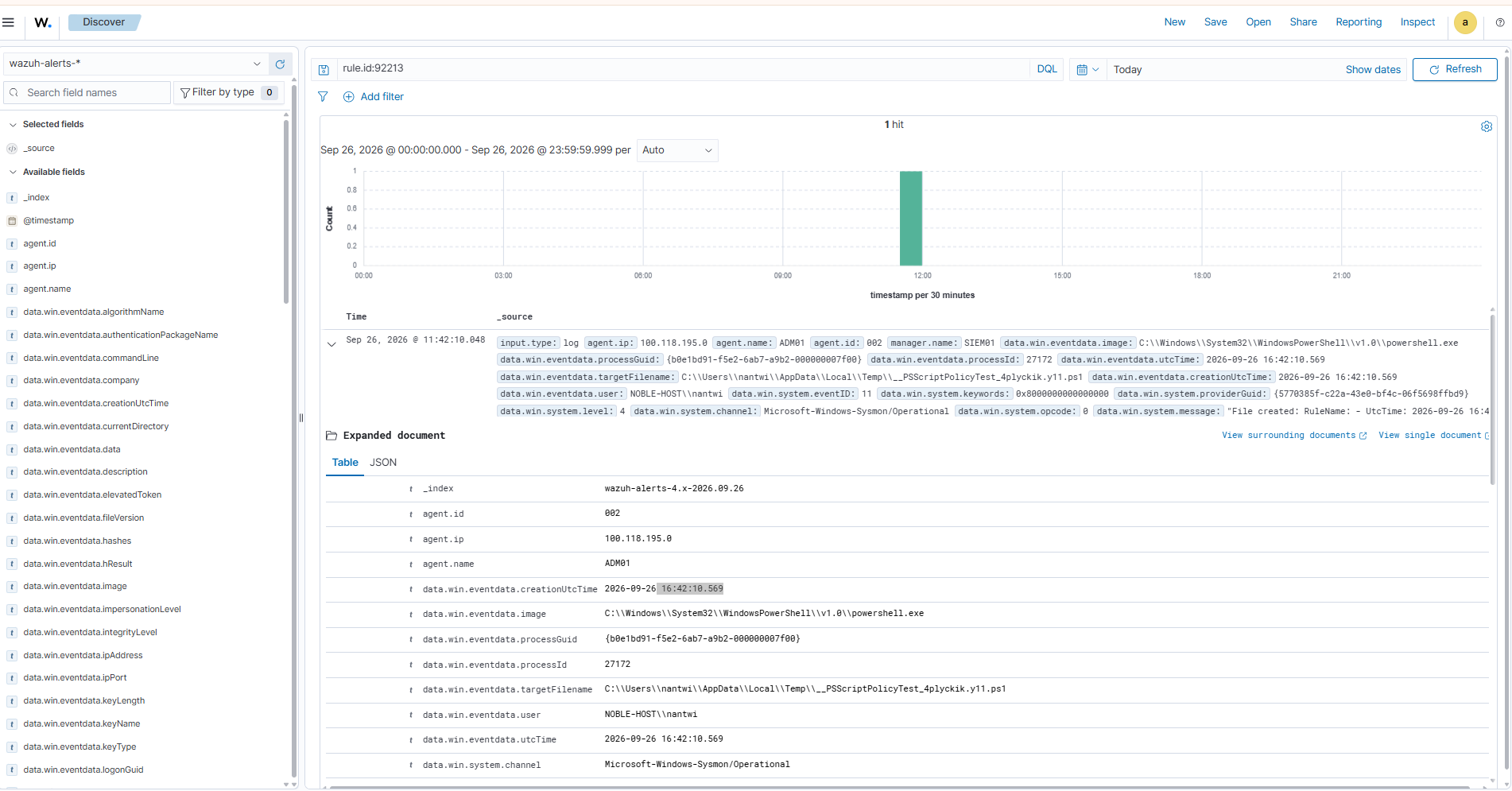
The rules went into place at 11:56. The last alert from rule 92213 that day came fourteen minutes earlier, and nothing has fired since. That is measured on live data, which is a stronger test than any lab harness.
The scanner pair got its own test three days later, during the next credentialed scan. Rule 92652 raised zero alerts. The noise left over was the scanner signing out, 622 logoff alerts in the first hour, so a third rule, 100022, now silences the scanner’s network logoffs too. A logoff carries no source address, so that rule checks the logon type instead, and an interactive logoff by that account, which should be impossible, still shows up.
Alerts are not events
That proof hides an uncomfortable fact.
Wazuh stores alerts, not events. Look again at the pipeline at the top of this note. Nothing is written to disk until after the score, and anything scoring below 3 is discarded. So my level 0 rule did not just silence an alert. It erased the event. “I chose not to be told about this” and “I made myself blind to this” were the same configuration.
Archives change exactly that: every decoded event is written down, whatever any rule decided. Switching them on takes three changes in three different places, and a gap in any one of them looks identical to failure.
| Step | Where | Decides |
|---|---|---|
| 1 | ossec.conf on the manager | whether the archive is written |
| 2 | filebeat.yml | whether it is shipped to the indexer |
| 3 | an index pattern in the dashboard | whether it can be searched |
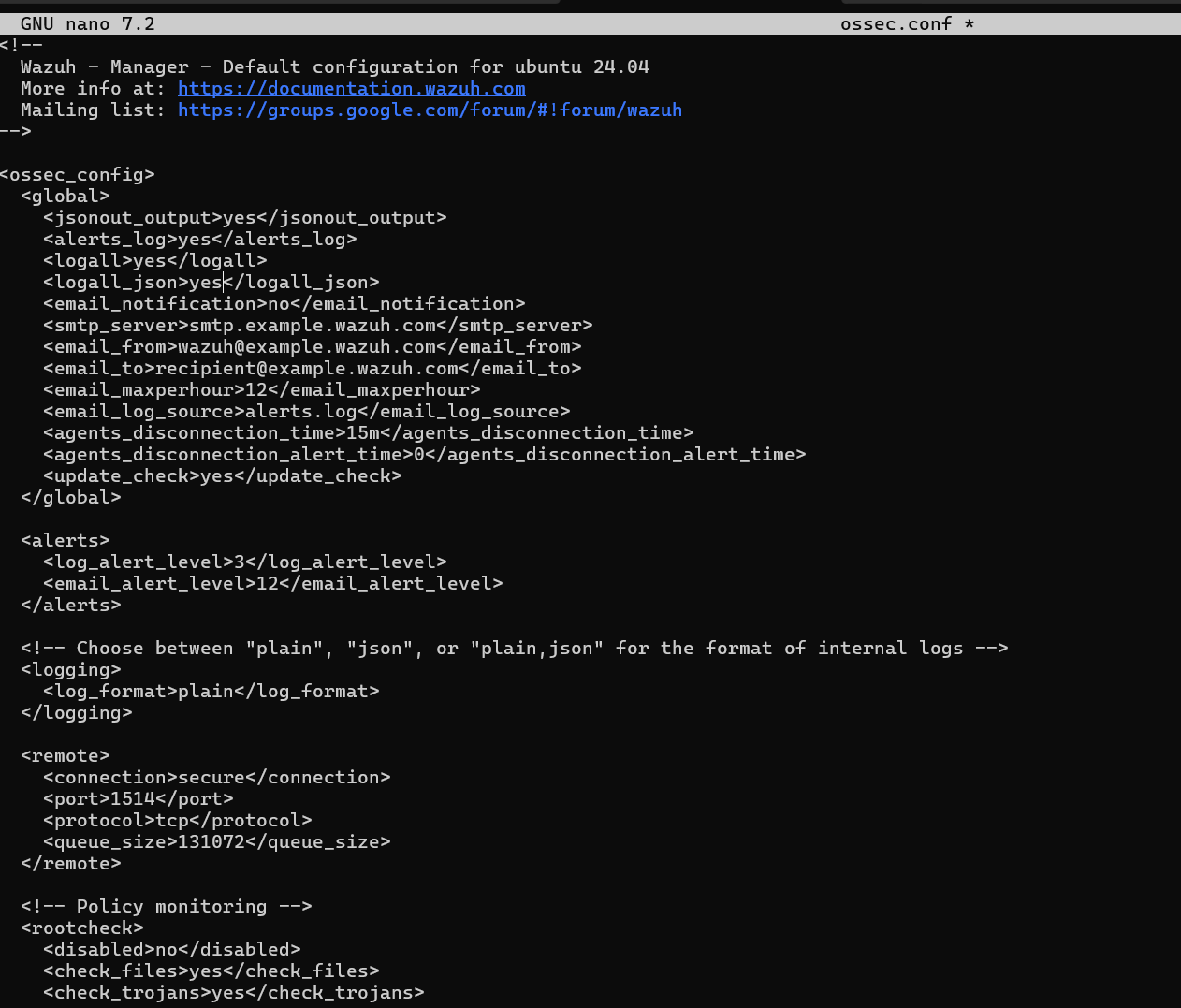
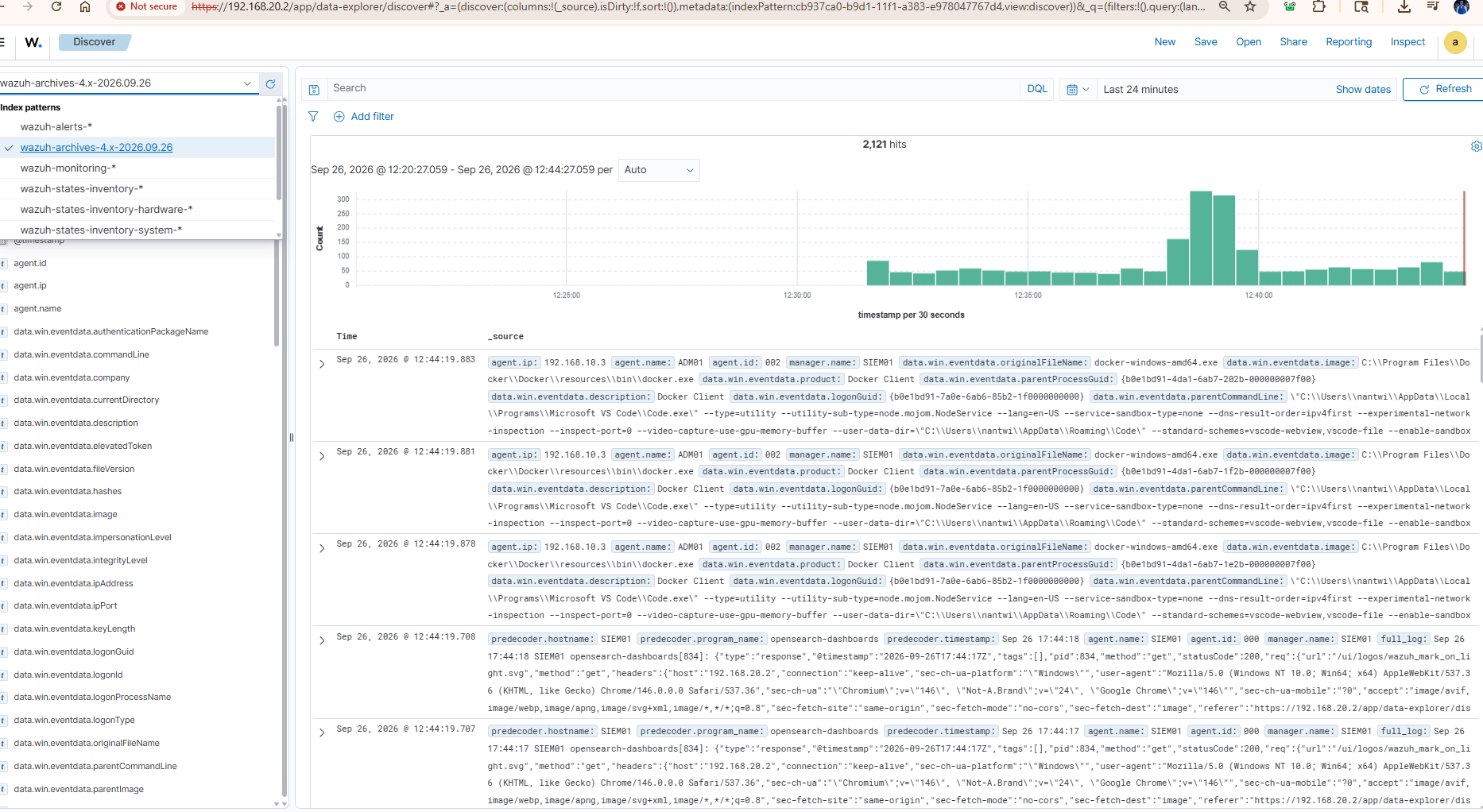
The numbers put the point plainly. Across the first few hours the manager decoded 39,322 events and wrote 1,963 alerts. Until archives were on, about 5% of what the SIEM saw was ever written down.
There is a cost, and I measured it rather than guessed, because my first estimate of the growth was wrong by about four times. Together the archive files were growing at about 2.3 GB a day before compression. A third of that was a plain-text copy of the same events that nothing ever read, so that copy went back off the same day. A retention policy on the archive index is the next job.
What I took from it
- A failing rule is silent. A pattern that never matches gives no error, no warning and no log line. Test detection logic against a real event in
wazuh-logtest; do not reason about it. - Never suppress on a single field. An exception that matches one string is a documented hole in the rule it modifies.
- Shape the exception to the question. For the PowerShell probe the question was “is this harmless?”. For the scanner it was “is this from where it should be?”, which turned into a quiet rule and a louder one.
- Silence the alert, not the evidence. A level 0 rule is only defensible if the event is still on the record somewhere.
- Verify the deployment, and validate before you restart. A restart of an unchanged configuration looks exactly like a successful deployment until you check.
The full chapter, with the control mapping and every screenshot, is chapter 20 of the homelab runbooks, and the rules themselves are in detections/wazuh.
